Fixing a Carriage Jam — HP Deskjet F4180 All-in-One Printer
Learn how to fix the HP Deskjet F4135, F4140, F4172, F4180, F4185, or F4190 All-in-One printer when you see a Carriage Jam error message on the control panel or on your computer.
The model shown is the HP Deskjet F4180 All-in-One printer.
The steps shown apply to these printers:
HP Deskjet F4135 All-in-One Printer
HP Deskjet F4140 All-in-One Printer
HP Deskjet F4172 All-in-One Printer
HP Deskjet F4180 All-in-One Printer
HP Deskjet F4185 All-in-One Printer
HP Deskjet F4190 All-in-One Printer
For other helpful videos go to hp.com/supportvideos or youtube.com/hpsupport. More support options for your printer are available at hp.com/support.
This video was produced by HP.

Replacing a Cartridge — HP Deskjet F4180 All-in-One Printer
Learn how to replace a cartridge in the HP Deskjet F4135, F4140, F4172, F4180, F4185, or F4190 All-in-One printer.
The model shown is the HP Deskjet F4180 All-in-One printer.
The steps shown apply to these printers:
HP Deskjet F4135 All-in-One Printer
HP Deskjet F4140 All-in-One Printer
HP Deskjet F4172 All-in-One Printer
HP Deskjet F4180 All-in-One Printer
HP Deskjet F4185 All-in-One Printer
HP Deskjet F4190 All-in-One Printer
Don’t know what cartridge you need? Visit www.suresupply.com.
For other helpful videos go to hp.com/supportvideos or youtube.com/hpsupport. More support options for your printer are available at hp.com/support.
This video was produced by HP.
120836 просмотров

Fixing Paper Pick-Up Issues — HP Deskjet F4180 All-in-One Printer
Learn how to fix the HP Deskjet F4135, F4140, F4172, F4180, F4185, or F4190 printer when it doesn’t pick up or feed paper, or you get an Out of Paper error message when paper is loaded.
The model shown is the HP Deskjet F4180 All-in-One printer.
The steps shown apply to these printers:
HP Deskjet F4135 All-in-One Printer
HP Deskjet F4140 All-in-One Printer
HP Deskjet F4172 All-in-One Printer
HP Deskjet F4180 All-in-One Printer
HP Deskjet F4185 All-in-One Printer
HP Deskjet F4190 All-in-One Printer
For other helpful videos go to hp.com/supportvideos or youtube.com/hpsupport. More support options for your printer are available at hp.com/support.
This video was produced by HP.
29092 просмотров

Fixing a Carriage Jam — HP Deskjet 2050 All-in-One Printer
Learn how to fix the HP Deskjet 2050 All-in-One printer (J510a, J510c) when the attention light displays on the control panel and you see a Carriage Jam error message on your computer.
The steps shown apply to these printers:
HP Deskjet 2050 All-in-One Printer (J510a)
HP Deskjet 2050 All-in-One Printer (J510c)
For other helpful videos go to hp.com/supportvideos or youtube.com/hpsupport. More support options for your printer are available at hp.com/support.
This video was produced by HP.
75625 просмотров

Replacing a Cartridge — HP Deskjet 1510 All-in-One Printer
Don’t know which cartridge you need? Visit http://www.suresupply.com.
Learn how to replace a cartridge in the HP Deskjet 1510 All-in-One printer.
The steps shown also apply to these printers:
HP Deskjet 1512 All-in-One Printer
HP Deskjet 1513 All-in-One Printer
HP Deskjet 1514 All-in-One Printer
HP Deskjet Ink Advantage 1515 All-in-One Printer
For other helpful videos go to hp.com/supportvideos or youtube.com/hpsupport. More support options for your printer are available at hp.com/support.
This video was produced by HP.
118010 просмотров
![Como resetear un Cartucho HP 21 (Hack cartucho de tinta) [ZtickHacks]](http://i.ytimg.com/vi/FsCcZtRvzpI/mqdefault.jpg)
Como resetear un Cartucho HP 21 (Hack cartucho de tinta) [ZtickHacks]
Reseteo (Resetear) Compatible con (Según comentarios) HP 300 342 343 344 348 350 351 100 301 901 56 57 21, 22 61 62 650
F.A.Q (Comentarios, inbox, irl)
1)Q:-Funciona con «X» cartucho?/Funciona con HP XX?-
R: En teoria podria llegar a funcionar pero no lo puedo asegurar.
Update: Me dicen que esta tecnica funciona con los cartuchos: HP 300 342 343 344 348 350 351 100 301 901 56 57 21, 22 61 62 650
2)Q: Ahora me ahorrare mucho dinero en tinta no?
R: Como dije en el video, sugiero hacer esto 1 sola vez, ya que esto gasta la poca tinta que aun le queda al cartucho (ya que no se gasta 100%).
3) Q: Recargue mi cartucho pero no funciona :S
R: La pregunta no tiene que ver con el video. Pero para que funcione debes resetearlo.
Si les gusto el vídeo no olviden ponerle Like suscribe y compartir!
Tampoco olvides seguirme en
Twitter: http://bit.ly/1pvj4Er
Y Facebook: http://on.fb.me/1qOZCTg
—-
En este video explico como resetearun cartucho HP 21
Nota: Esto solo puede funcionar bien 1 ó 2 veces por cartucho.
Video Xbox one vs PS4: https://www.youtube.com/watch?v=Q_tfY3ecljw
135825 просмотров

Resetear cartuchos HP
En este vídeo les muestro como resetear cartuchos de impresoras HP, cuyos modelos de cartuchos o cartriged son HP21 Y HP22, les detallo paso a paso el proceso para que ustedes al igual que yo puedan ahorrar muchísima tinta sin tener que gastar un dineral en cartuchos (cartrigeds) nuevos.
MSSX®.
812592 просмотров

Renew your printer pickup roller! No more paper jams! Don’t replace: rejuvenate! An easy fix!
Tired of paper jamming? Usually it means the pickup roller is slipping. Fix it in a few minutes by coating the roller to make it like new again! No need to replace the rubber roller! I show how to make any printer pick up paper like it was brand new! Wow, eh?
For links for WHERE TO GET the rubber roller rejuvenator, visit my web page:
http://www.maximpulse.com/printer/
I have no connection with the company that makes this product. I simply bought it, used it and it works great, so I’m sharing the good news!
Hand feeding paper into a printer and clearing paper jams sure gets old fast. Now I am experiencing temporary happiness. I found a product that has made my printer pick up paper again! No more misfeeds! I was so tired of paper starting to feed and then jamming I can’t describe it. This video shows how to rejuvenate the rubber roller(s) that grab the paper and feed it in. True happiness awaits you, too.
A product that works. Isn’t that cool?
79303 просмотров

Limpieza y recarga de cartucho HP 22 y 57
Limpieza y recarga de cartucho HP 22 y 57
269548 просмотров

Reset HP
Jak zrezetovat HP Image monitor, aby ukazoval 100procentní stav náplně inkoustu v náplni? (How reset HP Image monitor to see 100procent of ink?)
83193 просмотров

Tutorial — Instalación de un Sistema de Tinta Continua en Impresoras — Paso a Paso
Que tal amigos aquí les dejo un tutorial de como instalar un sistema de tinta continua en cualquier impresora. Saludos y espero que les sea de gran utilidad.
Visiten nuestra página web donde encontrarán una gran variedad de tutoriales:
http://www.jetutoriales.com
240738 просмотров

How To Fix HP Printer with Blinking Lights
Mike from Sysguru gives us an in depth look at why HP printers suck so bad and what steps were ultimately required to fix his failing HP Officejet c7280.
39796 просмотров


How to reset HP Ink Levels
This has been confirmed to work on the following printers:
HP F4280, HP F380, HP Deskjet 6988
HOWEVER, It works for quite a lot of other HP models if it worked for you please let me know in the comments below so I can add that printer to the list.
Switch the Printer ON by pressing the Power Button (Make Sure Paper is not Loaded)
STEPS:
Once switched on, hold down the Power Button (DO NOT RELEASE)
Now press the Cancel Button and let go of it
Now Release the Power Button
Wait...
The INK LED will light up, After a while it will attempt to print a sheet but because there is no paper the resume button will blink
Now press cancel
You have completed the steps and now should be able to print if not attempt this again from STEPS 1-7
249593 просмотров

Hp deskjet F2400 series
HP Deskjet F2420, F2423, F2476, F2480, F2483, F2488, F2492, F2493
57213 просмотров

RESETEAR UNA IMPRESORA HP C4180 Y CARTUCHOS HP93
me salio un error que me tiraban la impresora por los cartuchos y con esto lo solucione y quise compartirlo
61372 просмотров

HP Deskjet F4180 problemas al imprimir, se detiene el carro a media impresion
Hola espero me puedan ayudar tengo una HP Deskjet F4180 y a la hora de imprimir una imagen o lo que sea empieza bien, pero a la mitad del documento se detiene por si sola marcando error y parpadeando el led de carga de papel. Ya le hice de todo espero me puedan ayudar saludos.
6956 просмотров

7 Ways to Clean Blocked Clogged Ink Cartridges
This video explains how to clean a clogged, blocked inkjet cartridge.
With subtitles: ckick on CC button to activate subtitles in your language.
if you leave an inkjet cartridge sitting in your printer without using it for several time, it can clog. The clog occur when ink on the printhead of the cartridge dries up and won’t allow additional ink to pass by.
If the printer head nozzles are blocked or dried out, you will need to dissolve the dried ink.
Use these methods only on cartridges with the head built into the cartridge, Like hewlett packard, samsung, and most of canon and lexmark.
Do not use in epson cartridges, brother, and canon cartridges without printhead.
it would be useless. in this type of printer, the printhead is in the printer.
If you fill a clogged cartridge, the new ink will not unclog the head. — Use plastic gloves to protect your hands — For any question or suggestion leave a comment
—-
Link Accessori srl
Via Beverara 224/7
40131 BOLOGNA (Italy)
http://www.linkaccessori.it
email: [email protected]
other links:
http://www.emmegiricambi.it/
http://welcome.hp.com/country/us/en/prodserv/printing_multifunction.html
—-
372840 просмотров

Bulk Ink para HP F4180 — Guter Ink
Sistema Contínuo de Tinta para impressoras HP — Continuous Inking System
58572 просмотров

HP DeskJet 2515 Ink Advantage TEST
Pełna recenzja: http://www.videotesty.pl/recenzja/815/HP-DeskJet-2515-Ink-Advantage-TEST/ *
Tablet | Smartfone | Test | Recenzja | Samsung | iPad | Apple | iPhone |
Zastanawiasz się nad zakupem takich produktów jak tablet, smartfon, laptop lub komputer PC... Zobacz nasze materiały video z produktem, który chcesz kupić. Zapoznaj się z naszymi Opiniami oraz Poradami. Podejmij świadomie decyzję zakupową. Pamiętaj „Zobacz zanim kupisz» i nie kupuj kota w worku J
Na naszym kanale VideoTesty znajdziesz Testy i Recenzje produktów najpopularniejszych producentów, m. in.: Samsung, Nokia, Apple, Sony, HP oraz Blackberry. Nasi eksperci redakcyjni chętnie odpowiedzą na Wasze pytania w komentarzach.
Zobacz http://VideoTesty.pl i przeczytaj pełne teksty recenzji.
https://www.facebook.com/videotesty
Zostać naszym widzem. Miłego oglądania. *
Nie trać czasu na oglądanie wszystkich filmów.
Wybierz interesującą Ciebie kategorię:
Testy Telefonów i nie tylko ► http://bit.ly/sprzet_Mobilny
Testy sprzętu dla Graczy ► http://bit.ly/dla_Graczy
Strefa Gier — Gameplaye ► http://bit.ly/testy_gier
Poradniki, Instalacje ► http://bit.ly/Poradniki
Sprzętu Komputerowy ► http://bit.ly/sprzet_Komputerowy
Drobne AGD i nie tylko ► http://bit.ly/inny
Monitory, Telewizory... ► http://bit.ly/TV_Monitory
Testy sprzętu Foto-Video ► http://bit.ly/Foto_Wideo *
Kupuj Tanio i Bezpiecznie w naszym Sklepie ► http://bit.ly/Sklep_VideoTesty
53955 просмотров

HP Deskjet Ink Advantage 2545 All-in-One A9U23C
МФУ HP Deskjet Ink Advantage 2545 All-in-One A9U23C
Общие характеристики:
Устройство — принтер/сканер/копир
Тип печати — цветная
Технология печати — термическая струйная
Размещение — настольный
Область применения — персональный
Принтер:
Максимальный формат — A4
Печать фотографий — есть
Количество цветов — 4
Печать без полей — есть
Максимальное разрешение для ч/б печати — 600x600 dpi
Максимальное разрешение для цветной печати — 4800x1200 dpi
Скорость печати — 7 стр/мин (ч/б А4), 4 стр/мин (цветн. А4)
Время выхода первого отпечатка — 17 c (ч/б), 24 c (цветн.)
Сканер:
Тип сканера — планшетный
Максимальный формат оригинала — A4
Максимальный размер сканирования — 216x297 мм
Глубина цвета — 24 бит
Оттенки серого — 256
Разрешение сканера 1200x1200 dpi
Копир:
Максимальное разрешение копира (ч/б) — 600x300 dpi
Максимальное разрешение копира (цветн.) — 600x300 dpi
Скорость копирования — 7 стр/мин (ч/б А4), 4 стр/мин (цветн. А4)
Максимальное количество копий за цикл — 5
Лотки:
Подача бумаги — 60 лист. (стандартная)
Вывод бумаги — 25 лист. (стандартный)
Расходные материалы:
Плотность бумаги — 60-280 г/м2
Печать — на карточках, пленках, этикетках, фотобумаге, глянцевой бумаге, конвертах, матовой бумаге
Ресурс цветного картриджа/тонера — 200 страниц
Ресурс ч/б картриджа/тонера — 360 страниц
Количество картриджей — 2
Тип картриджа/тонера — черный картридж HP 650 CZ101AE; трехцветный картридж HP 650 CZ102AE
Интерфейсы:
Интерфейсы — Wi-Fi, 802.11n, USB 2.0
Поддержка AirPrint — есть
Дополнительная информация:
Поддержка ОС — Windows, Mac OS
Отображение информации — ЖК-панель
Диагональ дисплея — 1.1 дюйм.
Потребляемая мощность (при работе) — 10 Вт
Потребляемая мощность (в режиме ожидания) — 2 Вт
Габариты (ШхВхГ) — 425x252x552 мм
Вес — 3.6 кг
18726 просмотров
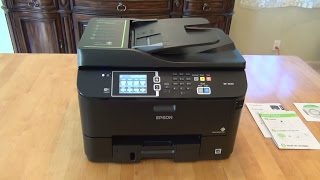
Epson WorkForce Pro WF-4630 All-in-One Printer Review
Review: 5/5
Economical Power House that Improves Upon the 4530/4540.
This is a great, economical, high performing printer. It is noticeably improved from the previous model, the Epson WP-4530 / WP-4540. I owned and loved the WP-4540 as my primary printer. This WF-4630/WF-4640 improves upon the 4530/4540 by: (1) A noticeably better color touch screen that is more colorful, more responsive, better audio cues. (2) Has more options and features. (3) Scans faster at higher resolution levels. It continues the benefits of fast printing, duplex (2-sided) printing, fast scanning, duplex (2-sided) scanning, easy setup and software, great wireless, economical printing with large capacity 786 & 786XL ink cartridge support, great print quality, and just being a power house. This seems to be a decent upgrade.
The only difference in the WF-4640 vs WF-4630 is whether or not it comes with an optional second paper tray to place under the unit that is the same otherwise. I have the WP-4540 that has the extra tray, and decided not to use it because it made the printer larger and I just didn’t need the capacity before reloading in my home office. I use duplex printing and scanning a lot on the previous model (WP-4540). I love that it just mounts the USB port as a remote drive, so I just leave a USB key plugged in and copy the files from my PC. Scanning directly to PC (on the old model at least) was significantly slower and didn’t offer many of the options for some reason. After a short while, scanning would sometimes pull in too many pages at a time, so I just feed them one at a time when I hear the audible click when the existing page is pulled in far enough. Two sided scanning works sell, but if too many pages pile up in the output, it can suck some previous pages back in from the output tray as it pulls the current page back for a second pass or to flip it.
The only concern I have is whether or not the 4630/4640 fixes the common internal defect that plagued the 4530/4540. After a year, many 4530/4540s would leak yellow ink in a single line down the center of the page until exhausted, ruining output for a while, until you ended up with a high quality black & white printer. Mine was affected by that, but Epson replaced mine free of charge after the warranty expired. My WP-4540 still has some banding on color output sometimes. I am just hoping the 4630/4640 has rooted out the problem. Btw, my Epson Workforce 840 that I infrequently print to has never had a problem. Only time will tell. But everything else about it shows me that they improved a number of things.
Product Title: Epson WorkForce Pro WF-4630 Wireless and WiFi Direct All-in-One Color Inkjet Printer, Copier, Scanner, 2-Sided Auto Duplex, ADF, Fax. Prints from Tablet/Smartphone. AirPrint Compatible. (C11CD10201)
Model: C11CD10201
20068 просмотров

Unboxing — Multifuncional HP Deskjet 1516
LEIA A DESCRIÇÃO!
Multifuncional HP Deskjet Ink Advantage 1516 — Colorida / Copiadora / Impressora / Scanner
MAGAZINE LUIZA
De R$ 279, 00 por R$ 199, 00 ou em até 6x de R$ 33, 17 sem juros no cartão de crédito ou R$ 175, 12 à vista.
Informações técnicas:
Marca: HP
Referência: HP 1516.
Cor: Branca
Modelo: Ink Advantage 1516
Linha: HP Deskjet
Tipo de Multifuncional: Jato de tinta
Funções: Impressora, Scanner, Copiadora
Impressão
Velocidade de impressão: Preto (ISO): até 7 ppm; Preto (rascunho, A4): até 20 ppm; Preto (rascunho, carta): até 20 ppm; Saída da primeira página em preto (A4, pronta): velocidade máxima 17 segundos; Cor (ISO): até 4 ppm; Colorido (rascunho, A4): até 16 ppm; Colorido (rascunho, carta): até 16 ppm; Saída da primeira página em cores (A4, pronta): até 24 segundos.
Resolução de impressão: Preto (Melhor): até 600 x 600 dpi renderizados; Cor (Melhor): até 4800 x 1200 dpi otimizados e 1200 x 1200 dpi de entrada.
Itens inclusos: — 01 Multifuncional; — 01 Cartucho de tinta preta HP662; — 01 Cartucho de tinta tricolor HP662; — 01 CD do software; — 01 Pôster de instalação; — 01 Fonte de alimentação; — 01 Cabo de alimentação.
OBS:. Não vem com o cabo USB. Deve ser comprado separado
Comprar Multifuncional: http://goo.gl/Ob9BoN
Comprar Cabo USB: http://goo.gl/g8qGqN
24239 просмотров


HP OfficeJet 8500 Firmware Problems — Be Warned!! It’s a Lemon. Part 1
I made this video to point out major firmware problems with HP Office Jet Pro 8500A All-In-One Printers. This video will show you the deficiencies in this HP product. Be aware that you cannot trust that all HP products will function properly. If you review products ratings on Staples, Office Max, Office Depot, Best Buy, and other web sites, you will see all the problems people are having with this printer and other HP Printers. Think twice before you waste your money. SEE PART 2 FOR MORE ISSUES!!! http://www.youtube.com/watch?v=w3TQix-cvDA&feature=related
40867 просмотров

INSTALAÇÃO COMPLETA BULK INK F4180 PSC1410 1350 1315 1210
Sistema Contínuo de Tinta para impressoras HP F4180 e PSC 1410 1350 1315 1210 para adquirir nosso produto cesse www.mixcolorinformatica.com.br
25842 просмотров