4WD Arduino Sonar and IR Robot Test Run
Сентябрь 24, 2013
PLEASE READ THE INSTRUCTIONS BELOW !!!!!
Finally got this Arduino sonar and IR robot to run properly. Many many thanks to facz10 who shared his code for this robot and provided valuable help to address build and performance questions. Several modifications were made to make the robot a little easier to put together, otherwise, the kit was essentially complete — except of course for the all important code and assembly instructions...
Ended up using a 3S Lipo connected to a 5V/5A UBEC to bring the operating voltage down to 5V which the robot likes better — could have used PWM through the ENA / ENB to control the speed — but that's for another day....
Changed the turn time (rate) from 900 to 600 to change the turn ratio closer to 90 deg. and it works better this way.
Second build using the same code... http://youtu.be/221yDLxmYxc
Please visit the facz10 channel for help.... http://youtu.be/f8ZBd4TpMBg
Other helpful sites for tips and wiring help.
A) http://adhocnode.com/arduino-irrecv-module/
B) http://arduino-info.wikispaces.com/IR-RemoteControl
C) http://adhocnode.com/motor-control/
D) http://adhocnode.com/arduino-robot-kit-wiring-diagram/
Get the updated IR robot code on the link below... courtesy of "facz10"...
E) http://letsmakerobots.com/node/40502
Good luck on your builds!
1 1
320,468 просмотров

Maybe the best robot demo ever | Marco Tempest
Marco Tempest uses charming stagecraft to demo EDI, the multi-purpose robot designed to work very closely with humans. Less a magic trick than an intricately choreographed performance, Tempest shows off the robot's sensing technology, safety features and strength, and makes the case for a closer human-robot relationship. (Okay, there's a little magic, too.)
TEDTalks is a daily video podcast of the best talks and performances from the TED Conference, where the world's leading thinkers and doers give the talk of their lives in 18 minutes (or less). Look for talks on Technology, Entertainment and Design — plus science, business, global issues, the arts and much more.
Find closed captions and translated subtitles in many languages at http://www.ted.com/translate
Follow TED news on Twitter: http://www.twitter.com/tednews
Like TED on Facebook: https://www.facebook.com/TED
Subscribe to our channel: http://www.youtube.com/user/TEDtalksDirector
23154 4574
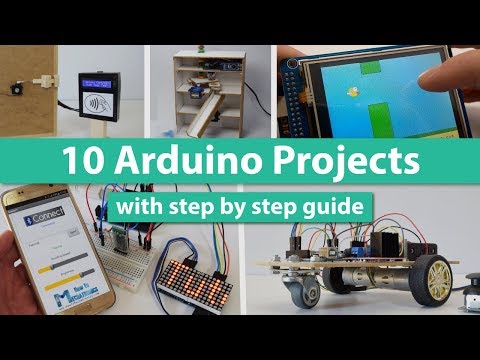
10 Arduino Projects with DIY Step by Step Tutorials
https://howtomechatronics.com/arduino-projects/ ► Find more details, circuit schematics and source codes on my official website.
New 7 Pro Arduino Projects with DIY Instructions: https://youtu.be/XxmD70Wvmdw
10 Arduino Projects. For each Arduino project you can find step by step guide on how to do it yourself with included circuit schematics, source codes and videos:
1. Arduino Color Sorter: https://howtomechatronics.com/projects/arduino-color-sorter-project/
2. Arduino Robot Car: https://howtomechatronics.com/tutorials/arduino/arduino-dc-motor-control-tutorial-l298n-pwm-h-bridge/
3. Arduino Robot Car Wireless Control: https://howtomechatronics.com/tutorials/arduino/arduino-robot-car-wireless-control-using-hc-05-bluetooth-nrf24l01-and-hc-12-transceiver-modules/
4. DIY Vending Machine: https://howtomechatronics.com/projects/diy-vending-machine-arduino-based-mechatronics-project/
5. Arduino Game Project: https://howtomechatronics.com/projects/arduino-game-project-replica-of-flappy-bird-for-arduino-on-a-tft-touch-screen/
6. RFID Access Control System: https://howtomechatronics.com/tutorials/arduino/rfid-works-make-arduino-based-rfid-door-lock/
7. Arduino Radar (Sonar): https://howtomechatronics.com/projects/arduino-radar-project/
8. Arduino LED Matrix Scrolling Text: https://howtomechatronics.com/tutorials/arduino/8x8-led-matrix-max7219-tutorial-scrolling-text-android-control-via-bluetooth/
9. Arduino Security and Alarm System Project: https://howtomechatronics.com/projects/arduino-security-alarm-system-project/
10. Arduino Music Player and Alarm Clock with Touch Screen: https://howtomechatronics.com/projects/arduino-touch-screen-music-player-alarm-clock-project/
Visit HowToMechatronics.com for more Tutorials, Tips, Projects and How It Works videos:
► https://howtomechatronics.com/
Like my page on Facebook:
► https://www.facebook.com/howtomechatronics
Add me on Google :
►https://plus.google.com/ Howtomechatronics
18639 531

Lynxmotion Rover robot
Lynxmotion A4WD1 v.2 rover AL5C robotic arm, Xbee wireless control by remote PC, GPS module, main controler ATmega128, Visual Basic 2008 — control program, made by Frantisek Durovsky, Technical university Kosice, Slovakia, Faculty of Electrical Engineering and Informatics
136 1
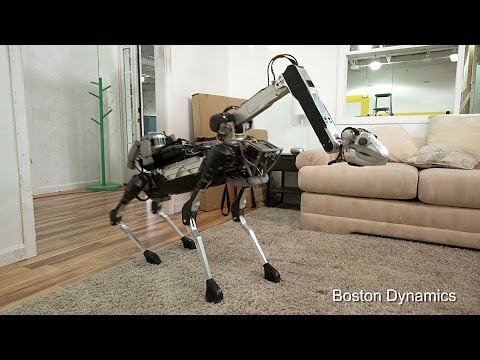
Introducing SpotMini
SpotMini is a new smaller version of the Spot robot, weighing 55 lbs dripping wet (65 lbs if you include its arm.) SpotMini is all-electric (no hydraulics) and runs for about 90 minutes on a charge, depending on what it is doing. SpotMini is one of the quietest robots we have ever built. It has a variety of sensors, including depth cameras, a solid state gyro (IMU) and proprioception sensors in the limbs. These sensors help with navigation and mobile manipulation. SpotMini performs some tasks autonomously, but often uses a human for high-level guidance. For more information about SpotMini visit our website at www.BostonDynamics.com
114749 8731

Top 10 Arduino Projects
Top 10 Cool arduino projects/arduino uno Projects.
Top 10 DIY innovative arduino projects, This video shares Cool Ideas of some of Advanced arduino Projects.
http://rztronics.com/arduino-board-open-source-projects-for-beginners/
All these Projects are Based on Arduino Microcontroller and use some basic sensors like sonar, Infrared, Force sensor, some components like servos, motors, LED's, Displays, shields etc.The Arduino UNO r3 is a microcontroller board based on the ATmega328. It has 14 digital input/output pins (of which 6 can be used as PWM outputs), 6 analog inputs, a 16 MHz crystal oscillator, a USB connection, a power jack, an ICSP header, and a reset button.You too can make these Amazing projects at Home.
Don't Forget to subscribe and like the Video:D
10.Make your Own Arduino-http://adf.ly/1cktel
9.Arduino Drawing Machine-http://adf.ly/1cktjv
8.Arduino Self Balancing Robot-http://adf.ly/1cktmN
7.Arduino Smart Watch-http://adf.ly/1cktoC
6.Arduino Spider Quadruped Robot-http://adf.ly/1ckts4
5.Arduino Quadcopter-http://adf.ly/1cktyB
4.Arduino Gesture controlled Robotic Arm-http://adf.ly/1cktzx
3.Arduino Rubik's cube Solver-http://adf.ly/1cku3Q
2.DIY Arduino 3D Printer Scratch Build-http://adf.ly/1cku6Y
1.Arduino Ball and Plate PID Control-http://adf.ly/1cku93
1 1
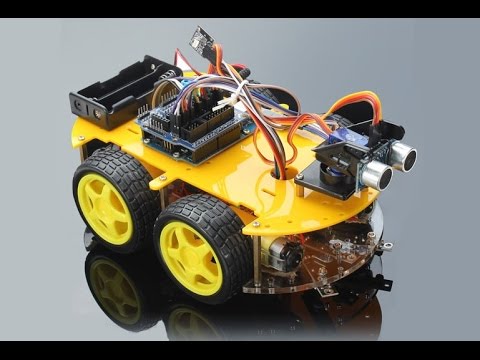
КАК СДЕЛАТЬ ARDUINO РОБОТ МАШИНКУ КОТОРЫЙ ОБХОДИТ ПРЕПЯТСТВИЯ
Купить arduino робот: http://ali.pub/24xxfc
_____________________________________
Программа для управления роботом: https://yadi.sk/i/xO6Ixue8r6Y2J
Группа в ВК: https://goo.gl/pE36V9
Реклама на канале: https://goo.gl/r9jM6p
Почта (для сотрудничества): [email protected]
В этом выпуске вы узнаете: как собрать ардуино робот машинку из Китая; как сделать робота, который обходит препятствия с помощью ультрозвукового датчика и сервопривода. Если вы хотите делать самодельные роботы, то arduino лучше всего для этого подходит. Создание робота на ардуино будет интересно и практично, справится с этим сможет даже новичок.
___
Смотрите наши видео, в которых мы простым языком рассказываем о радиотехнике, электронике и радиоэлектронике!
Наши уроки будут особенно полезны для начинающих радиолюбителей и студентов радиотехнических ВУЗов.
В видеороликах мы даём основы электроники: определения, описания, схемы и принцип работы различных элементов радиотехники.
В наших видео вы узнаете: что такое транзистор, диод, конденсатор, резистор, микросхема, электрический ток и много других разных интересных вещей и явлений, связанных с электроникой.
3614 211

These Ancient Relics Are So Advanced They Shouldn't Exist...
First 500 people get a free 2 month trial of Skillshare http://skl.sh/thoughty3
Get The Thoughty2 Book: http://bit.ly/thoughtybook
JOIN The PRIVATE Thoughty2 Club & Get Exclusive Perks! http://bit.ly/t2club
SUBSCRIBE — New Video Every Two Weeks http://bit.ly/thoughty2
BECOME A PATRON and support Thoughty2: https://www.patreon.com/thoughty2
Thoughty2 Merchandise: https://shop.thoughty2.com/
Thoughty2 Facebook: http://bit.ly/thoughtyfb
Thoughty2 Instagram: http://bit.ly/t2insta
Get My Kit:
Camera: https://geni.us/oQODU
Mic: https://geni.us/IxCkW7
Memory Card: https://geni.us/sUAwUqf
Video Lights: https://geni.us/rYr4s07
Thanks to The Patreon Research Team:
David Davenport, Michael Mulligan, Jeff Li, Anais Namahoro, Noa
129795 14718

Smartphone Controlled Arduino 4WD Robot Car ( Part - II )
#arduinocar, #bluetoothcar, #smartphone_controlled_car
This video shows how to make a Smartphone controlled Arduino Robot Car.
********************************************************************
Project Details :
http://www.instructables.com/id/Smartphone-Controlled-Arduino-Rover/
Down; oad the Code :
http://www.instructables.com/id/Smartphone-Controlled-Arduino-Rover/step15/Software/
Download the app :
https://play.google.com/store/apps/details?id=appinventor.ai_el_profe_garcia.Arduino_Control_Car&hl=en
*******************************************************************
Now You can enjoy the following products with big discounts
GearBest Big Deal : https://goo.gl/WoJ9Zz
Creality CR-10 3D printer : https://goo.gl/7aU5fY
Coupon : CR10SUP
Checkout this smaller version of Creality CR-10 with big discount.
Creality CR-10 Mini : https://goo.gl/VZWy1u
Coupon Code : CR10MINI
AnyCubic i3 Mega 3D Printer : https://goo.gl/PLM46w
Coupon : THE_I3GEAB / THE_I3MEGAUS
Anet A8 3D Printer : https://goo.gl/dAJ6fu
Coupon : GBA8EU
Anet A6 3D printer : https://goo.gl/Yqidt3
Coupon : GBA6EU
Xiaomi Mi Robot Vacuum : https://goo.gl/DaxyCR
Coupon: XIAOMIVAC
Xiaomi Air 12 Laptop : https://goo.gl/Bvumb2
Coupon: Xiaomiair12N
XIAOMI Mi A1 4G Phablet : https://goo.gl/KPuapv
Coupon: XMA1GJ
***********************************************
Parts :
1. 4WD Robot Chassis kit : https://goo.gl/lqICgH
India link : http://amzn.to/2tBG6mz
2. Arduino Nano : https://goo.gl/8Fb74o
India link : http://amzn.to/2tAYEnc
3. LM298 H bridge Module : https://goo.gl/F2EQbM
India link : http://amzn.to/2uVGTiG
4. Bluetooth Module HC-06 : http://amzn.to/2gb4IsA
India link : http://amzn.to/2vNwIZV
5. 2 x 18650 Li Ion Battery : https://goo.gl/BP67Bc
India link : http://amzn.to/2vylusK
6. 2x 18650 Battery Holder : http://amzn.to/2fgQRlB
India link : http://amzn.to/2vNPiAO
7. Mini Bread Board : https://goo.gl/M7xYSU
India link: http://amzn.to/2vyQFEy
8. 0.5 sqmm Wires
9. Male-Female Jumper Wires : https://goo.gl/Vdu2J5
India link: http://amzn.to/2vyKi42
10. Male-Male Jumper Wires : https://goo.gl/dSni1N
7. Duct Tape or any other tape : http://amzn.to/2fdo5yO
8. Smartphone
Tools Required :
1. Soldering Iron : http://amzn.to/2gsyrjG
India link : http://amzn.to/2tBguWR
2. Wire Cutter : http://amzn.to/2fgRVpv
India link : http://amzn.to/2vyfXT9
3. Wire Stripper : https://goo.gl/mlVF28
India link : http://amzn.to/2upbhi1
***************************************************************
Music credit :
Inova — Seamonster: https://youtu.be/8kmZWGhumUE
12639 1057

Building and Controlling 4WD Arduino Robot using Android Joystick App
This video demonstrates the steps to assemble out-of-the-box 4WD Arduino robot. All you need is just an Arduino board, a dual channel motor driver shield, a bluetooth module (eg. HC-06) and a 7.4V LiPo battery pack. The robot is finally controlled within minutes by an Android joystick app available on Google Play.
To get the Arduino sample code, just click this link: https://goo.gl/iDCNqU with the help of circuit diagram here: https://goo.gl/L3k9X8. Commented code: https://goo.gl/bZpL66 (added on 22 Feb 2018).
If you happen to use "ArduMoto" board as the motor driver as shown in this picture (https://goo.gl/xPSxUK), you may simply use this sample code: https://goo.gl/7H5hAx using this schematic diagram as the guidance: https://goo.gl/RyWeAx.
Or if you prefer the classic L298N type of motor driver as shown in the picture here (https://goo.gl/ZL0NlE), or in the video here (https://youtu.be/MBs023AoHQk) and the circuit diagram here (https://goo.gl/m7E8RR), then use this sample code: https://goo.gl/B5DHym.
Or else if you choose to stick with the 'super classic' Adafruit L293D Motor Driver Shield as shown here (https://goo.gl/AkVLsP) and here (https://goo.gl/xZEvM6), you may get the code here: https://goo.gl/YWJYfW with the help of circuit diagram as shown here: https://goo.gl/57rckQ. If you want to control 2 additional motors (like blade or arm actuator) on the robot, use this code: https://goo.gl/ME6NYf.
Having L9110S motor driver module? Then use this code: https://goo.gl/WmnDM9 (Viewer's contribution — Thanks Philip!)
Add the HC-SR04 ultrasonic sensor to your robot by referring to this schematic: https://goo.gl/xfujQD (for L298N) or https://goo.gl/e3X3H7 (for L293D).
Get the Arduino code for L298N here: https://goo.gl/rVprd9 and for L293D here: https://goo.gl/tMlBUU.
Watch this robot which uses the L293D Motor Shield being controlled autonomously by a color tracking app here: https://youtu.be/G78WBb5mOls.
Watch this app controls 2 servo motors simultaneously here: https://youtu.be/9Wl1gmq9J9A.
To watch the joystick app controls 3 wheeled omnidirectional robot, click here: https://youtu.be/anPVE9RmXUY and here: https://youtu.be/QQZ_SQd9YHc (Newer video).
Check out my new video of omnidirectional robot being controlled using Android smartphone via image processing (color tracking approach) at https://youtu.be/YnIY-CSk67o.
Happy roboting! Thank you.
Background Music: "Little Idea" & "Love" — Bensound.com
Joystick app on Google Play Full version (now equipped with Serial Monitor window which functions just like the Arduino IDE's Serial Monitor, but in mobile way, integrated with the app. Other than that it is also capable of producing omnidirectional 4WD output beside of omnidirectional 3WD or the 2WD/4WD differential drive and the raw X and Y joystick coordinates):
https://goo.gl/2oMk0S
Joystick app Free version:
https://goo.gl/CWynPX
Joystick app Lite version:
https://goo.gl/xHtnZb
Joystick app Lite Free version:
https://goo.gl/58zAtg
BT Serial Monitor:
https://goo.gl/1lW49f
BT Serial Terminal:
https://goo.gl/Nqg7rx
You may test out the new feature of Serial Monitor window on the Arduino Robot Joystick app using L293D motor driver by referring to this circuit diagram: https://goo.gl/DGEjKF and Arduino code: https://goo.gl/vaJeDj and additional reference pictures here: https://goo.gl/pvO4je. Make sure you use version 1.11 or higher of the app to use this new feature. A very quick tutorial video is available here: https://youtu.be/9c2HvJDNboE. The description on how to use the app for this project is attached in the given Arduino code in comment block form.
Now you can track your device's current location for real-time people and property surveillance purpose using Telegram Messenger via this TeleGPS app: http://goo.gl/0umbFO.
Display your messages at ease using LED display matrix through Bluetooth communication here: https://youtu.be/VM7h386KL88.
Watch my new videos featuring a 3WD omnidirectional robot performing obstacle avoidance task at https://youtu.be/3o3mJYype7E and localization challenge at https://youtu.be/OXmWRIoyrPU using Android smartphone as the main controller to carry out image processing job through color detection approach. For training session, watch it at https://youtu.be/OYguWM0Wp6g.
Another latest video: A soccer ball kicking mechanism (solenoid kicker) at https://youtu.be/fVGrYoqn-EU. Have a look! Thanks!
1293 48
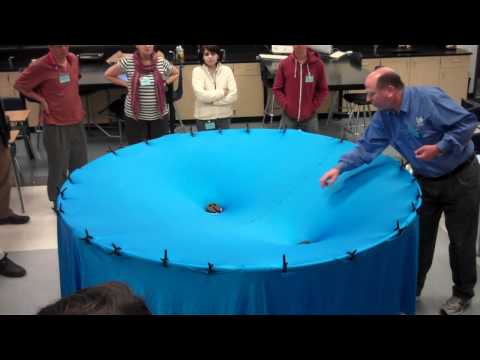
Gravity Visualized
Help Keep PTSOS Going, Click Here: https://www.gofundme.com/ptsos
Dan Burns explains his space-time warping demo at a PTSOS workshop at Los Gatos High School, on March 10, 2012. Thanks to Shannon Range from the Gravity Probe B program for creating the original demonstration which he shared with Dan in 2004.
Information on how to make your own Spacetime Simulator can be found here: https://youtu.be/2JOf1ub9US0
567147 41486
