Top 10 Single Board Computers for DIY Projects
Январь 14, 2018
Meet new super useful compilation: 10 Affordable Card-Size Computers for Makers and DIY Projects! Arduino and Raspberry Pi Compatible.
5 Amazing SBC 2018: https://youtu.be/fhAnI2g-O0M
00:00 — Marvin: plug & play IoT development board
http://kck.st/2fOMZWj
01:05 — UP Squared: the world’s fastest x86 maker board
www.up-board.org/upsquared
03:45 — ESPRESSObin: 64 bit dual core computing platform
http://espressobin.net
06:45 — UDO X86: the most powerful x86 maker board ever
https://www.udoo.org/udoo-x86
08:35 — CHIP: the first 9$ computer
https://getchip.com
09:25 — Le Potato: Fastest 4K SBC under $50 for Makers
https://libre.computer
10:40 — FireFly
http://fireflycomputers.com
13:15 — 1Bitsy and BMPM: open-source ARM Cortex-M4F Development Platform
http://kck.st/2ge890A
15:50 — Danyboard M0: Electronic prototyping platform
http://kck.st/2r5qJBV
17:10 — Exen Mini: a tiny 32-bit microcontroller compatible with arduino and breadboard development
https://nerdonic.com/products/exen/mini
Questions? Cooperation?
[email protected]
We will answer as soon as possible!
1742 369
192,126 просмотров
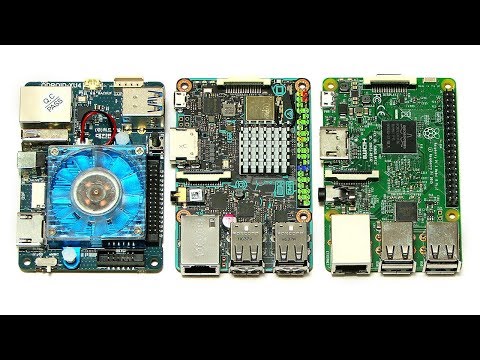
ODROID-XU4 vs Tinker Board & Raspberry Pi 3
ODROID-XU4, Asus Tinker Board and Raspberry Pi 3 single board computer head-to-head — comparing the hardware, then running Sysbench and other benchmark tests.
You can find the above SBCs on Amazon.com as follows:
ODROID-XU4: http://amzn.to/2AiNju4
Tinker Board: http://amzn.to/2ib4fYV
Raspberry Pi 3: http://amzn.to/2Aika1U
On Amazon UK, the links are:
Asus Tinker Board:
http://www.amazon.co.uk/dp/B01N35PQ9U/ref=nosim?tag=explainin-21
Raspberry Pi 3:
http://www.amazon.co.uk/dp/B01CD5VC92/ref=nosim?tag=explainin-21
And to buy an ODROID-XU4 in the UK, I would purchase directly from Hardkernel:
http://www.hardkernel.com/main/products/prdt_info.php?g_code=G143452239825
You may also find useful my individual review and setup videos here:
ODROID-XU4:
https://www.youtube.com/watch?v=PX_Oy-lSix8
Asus Tinker Board:
https://www.youtube.com/watch?v=CS66_BbalG8
Raspberry Pi 3:
https://www.youtube.com/watch?v=T_WlF9I5EGw
If you are interested in computing, you may also enjoy my book “Digital Genesis” on the future of computing, robots and AI: http://amzn.to/2Fu9pch
More videos on computing-related topics can be found at: http://www.youtube.com/explainingcomputers
You may also like my ExplainingTheFuture channel at: http://www.youtube.com/explainingthefuture
8935 214

TOP 10 CD/DVD/Floppy Drives based Projects
Projects Link:
10. Stroboscope Using Arduino
https://www.youtube.com/watch?v=VHGHCx4TX5Q
9. Turntable from Arduino
https://www.youtube.com/watch?v=UWYFxAKelqY
8.Anti-Gravity CD
https://www.youtube.com/watch?v=VqvsZzV2f3k
7.Burning Laser from DVD
https://www.youtube.com/watch?v=-m21xUwBjvU
6.He is a pirate on floppy drives
https://www.youtube.com/watch?v=zS2u6BPK5QY
5.CNC Plotter
https://www.youtube.com/watch?v=0sT3qlGAV_U
4.PCB Ink Plotter
https://www.youtube.com/watch?v=oPVc9ixj0iU
3.Music On Unconventional Instruments
https://www.youtube.com/watch?v=cabzXe8LLvo&feature=youtu.be
2. DIY 3D Printer
https://youtu.be/anIy6eb1fW0
1.Laser Engraver
https://www.youtube.com/watch?v=fi57H_X-AcY
12663 892

Mini-ITX Christmas PC Build for My Mom
I built a compact small form factor mini-itx productivity PC for my mom, for Christmas. Check out the build and the big reveal.
Article: https://tekeverything.com/productivity-pc-build-gift-mom/
My Amazon Store: https://www.amazon.com/shop/tekeverything
— Parts List —
Intel Core i3-7100: http://amzn.to/2zz5ffW
Gigabyte H270N: http://amzn.to/2zz2oU6
Noctua NH-L9i: http://amzn.to/2BV3rnD
Crucial 8GB RAM: http://amzn.to/2BGXVk3
Intel 545s SSD: https://goo.gl/H4W1VR
Realan E-W60: https://goo.gl/LdBVHP
— Follow Me —
Facebook: https://www.facebook.com/TekEverything
Twitter: https://twitter.com/TekEverything
Instagram: https://instagram.com/tekeverything/
12431 423
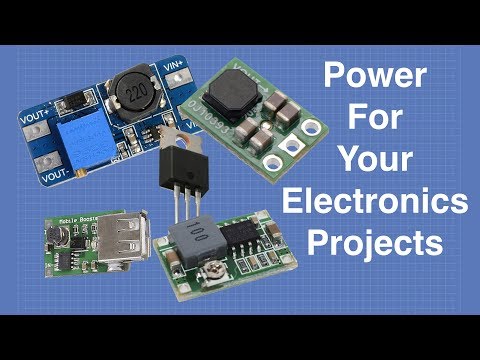
Power For Your Electronics Projects - Voltage Regulators and Converters
Full article at https://dbot.ws/pwrvolt
More info and projects at https://dronebotworkshop.com
Join the newsletter, and tell me what videos to make at https://dbot.ws/dbnews
Today we are going to look at the somewhat mundane but absolutely essential subject of supplying power for your electronic projects. Trust me, this stuff is important!
Electronic devices typically require either 5 or 3.3 volts, sometimes both. Other common voltage requirements include 6 and 12 volts for motors and displays. Some complex designs (ie. a robot) require several different supplies with different current capabilities.
When you build your latest robot or IoT device you’ll need to consider how you'll supply these voltages in the real world. On the workbench you can use a bench power supply if you have one, a USB adapter or even the USB port on a computer (just like with the Arduino).
But when your creation needs to exist on its own with a line-powered or battery power supply you’ll need to figure out how to get all of those voltages delivered to your components, preferably easily and inexpensively.
I have nine, yes nine methods of doing exactly that. Today I’ll show you a number of different voltage regulators and converters ranging from the classic 7805 3-pin voltage regulator to a tiny device that can supply a steady 5 volts even when your battery is about to die.
Check out the following Table of Contents to skip ahead to the power supply solution of your choice. Or just sit back and enjoy the show.
INTRO
Breadboard power supply module — 3:00
Power Supply Basics — 6:28
LINEAR REGULATORS
LM7805 — 5 Volt linear regulator — 11:42
LM317 — Variable linear regulator — 14:32
PSM-165 — 3.3 Volt linear regulator module — 17:52
AMS1117 — 5 Volt linear regulator module — 19:47
L4931CZ33-AP — 3.3 volt low voltage-drop regulator — 21:43
VOLTAGE CONVERTERS
Buck Converter Intro — 23:51
MINI-360 — Variable buck converter — 24:41
Boost Converter Intro — 26:46
PSM-205 — USB boost converter — 27:37
MT3608 — Variable boost converter — 29.07
Buck Boost Converter Intro — 31:06
S9V11F5 — 5 Volt buck boost converter — 33:06
That last module is the one I was referring to earlier, it really is an amazing device and is perfect for your battery powered projects.
As with all of my videos there is an article at https://dbot.ws/pwrvolt where you will find more details regarding all of the voltage regulators, buck converters, boost converters and buck boost converters mentioned here.
Now go power something up!
5217 85

LattePanda Alpha: Windows & Linux SBC
LattePanda Alpha Windows and Linux SBC review and demo, including full specification, installation of a WD Black NVME M.2 SSD, and other performance tests. Also details of the LattePanda Delta.
The LattePanda Alpha 864 reviewed in this video was kindly supplied by DF Robot. You can find out more about the LattePanda Alpha 864 on their website here: https://www.dfrobot.com/product-1729.html?Explainingcomputer1224
Details of the whole LattePanda range, including the Alpha and Delta models, can also be found here: https://www.dfrobot.com/category-177.html
You can learn more about M.2 NVME SSDs, and the WD Black model that I fit to the LattePanda Alpha, in my video here: https://www.youtube.com/watch?v=kvHUVcgo8xY
The test image I use in GIMP can be downloaded here: https://www.explainingcomputers.com/images/old_circuit_boards_3600x2400.jpg
The video in which I compare the performance of six other SBCs is here: https://www.youtube.com/watch?v=k4kMEbeORLo
And my review of the first LattePanda is here: https://www.youtube.com/watch?v=z5EXNfHYPfQ
More videos on computing and related topics can be found at: http://www.youtube.com/explainingcomputers
And I have another YouTube channel called ExplainingTheFuture at: http://www.youtube.com/explainingthefuture
#LattePandaAlpha #LattePanda #ExplainingComputers
8191 158

You can learn Arduino in 15 minutes.
The ultimate Arduino tutorial for beginners. Learn how to choose an Arduino, dim LEDs, build a motor speed controller and more. Sponsored by Audible — Get a free 30 day trial & download one free title: http://www.audible.com/afrotechmods
Example UNO kit: http://amzn.to/2mRjqLa
Example UNO robot kit: http://www.amazon.com/exec/obidos/ASIN/B07KPZ8RSZ/afromods-20
Website: http://www.afrotechmods.com
Twitter: http://twitter.com/Afrotechmods
Facebook: http://www.facebook.com/Afrotechmods/
If you are feeling extra generous, bookmark this link and use it as your Amazon home page:
http://www.amazon.com/?_encoding=UTF8&camp=1789&creative=9325&linkCode=ur2&tag=afromods-20
If you do that, I get a percentage of everything you buy, and you don't have to spend an extra dime!
#Arduino #Science #Engineering
71969 1207

10 Homemade Inventions You Need to See
You are watching 10 homemade life hacks and tricks and you
can do at home.simple incredible tricks.
Add me on Facebook (click LIKE on Facebook to add me)
http://on.fb.me/1lHLtqC
10 Life hacks that you can do it when you are bored.
1.Homemade 3D Hologram Projector for phones:https://youtu.be/9t0cOYvOy4M
2.Coin secret safe life hack:https://youtu.be/8v_9KkDABKI
3.Never Tangle Earbuds LifeHack:https://youtu.be/Q54VjqrIsYQ
4.iPhone Spy Camera — Lifehack:https://youtu.be/9YbMzKN6Wt4
5.Make Your Own Private Theater Box:https://youtu.be/zBit4giG8ng
6.How To Charge a Phone With Old DVD Drive:https://youtu.be/Jib-6qbTZTg
7.How To Make Clothespin Wire Stripper:https://youtu.be/hJ-_yXeSPvI
8.Make Phone Case from Shampoo Bottle!:https://youtu.be/KhPBA1Gkj7c
9.How To Make: Strike Anywhere Matches!:https://youtu.be/Jn1BwijxiYU
10.New i3DG Hologram for Smartphones and Tablets:https://youtu.be/2PH_WpO0_Io
19811 2940

Make Your Own 15.6" Full HD Screen for 32 bucks for use with Raspberry Pi, DSLR, Video camera
Alex shows you how to make your own 15.6" Full HD screen for about $32. Use with Raspberry Pi, DSLR, Video camera or any other computer. http://raspi.tv/?p=9447 We're repurposing a screen from a dead laptop.
Some people say "That's not full HD — it says 1280x800!" Well actually it IS a 1920 x 1080 LCD. At 4:48 you can see it's an LP156WF1. If you google the specs you'll see it's a 15.6" WLED full HD screen (which was one of the reasons I bought that laptop in the first place).
Here's a place that sells them (although they're out of stock)...
http://www.laptop-lcd-screen.co.uk/shop/LG-PHILIPS-LP156WF1-TLE2-15.6__28198.asp
So, then, why does it say 1280 x 800 on the video? It's simple. Even though this driver board is capable of running the screen at 1080p, I usually set up my Raspberry Pis to force that mode because it enlarges the text and icons on the screen. You can do this by putting...
# settings good for native 1280 x 800
hdmi_ignore_edid=0xa5000080
hdmi_group=2 # HDMIPi for 1280 x 800
hdmi_drive=2 # for alternative modes get sound
hdmi_mode=28 # 1280 x 800 @ 60 Hz
...into the config.txt
9871 393

NanoPi M4 : RK3399 SBC with 4 x USB 3.0
NanoPi M4 review and specification, including demos of Android, Lubuntu and Friendly Desktop. More information on this RK3399-based single board computer can be found on the Friendly Elec website at the following link:
https://www.friendlyarm.com/index.php?route=product/product&path=69&product_id=234
There is also a wiki page for the board here: http://wiki.friendlyarm.com/wiki/index.php/NanoPi_M4
With thanks to Friendly Elec for supplying the product and its heat sink for this video.
The image used in the GIMP test can be downloaded here: https://www.explainingcomputers.com/images/old_circuit_boards_3600x2400.jpg
My previous benchmark of six ARM-based SBCs, as referred to in this video, is at: https://www.youtube.com/watch?v=k4kMEbeORLo
And my most recent SBC extreme cooling video is at: https://www.youtube.com/watch?v=RxBaEiQHzLU
More videos on computing and related topics can be found at: http://www.youtube.com/explainingcomputers
And I have another YouTube channel called ExplainingTheFuture at: http://www.youtube.com/explainingthefuture
#NanoPi-M4 #NanoPiM4 #ExplainingComputers
5780 56

I built a PC out of rope and wood...
In this video I show you how I built a unique sculptural PC!
Big thanks to the following manufacturers and distributors for helping to support this project:
Western Digital with their 2TB m.2 drive
https://www.wdc.com/products/internal-ssd/wd-blue-3d-nand-sata-ssd.html#WDS200T2B0B
Burson Audio with their Play
https://www.bursonaudio.com/products/play/
Zotac with their GTX 1080
https://amzn.to/2H9EX9C
Noctua with 2x NH-D15
https://amzn.to/2Ehdgs0
Reichelt with the Z370-i
https://www.reichelt.com
Overclockers UK with the Lian-li PCI-E extension cable
http://www.overclockers.co.uk
Here is that threaded insert tool: https://amzn.to/2uJOdyz
For those interested, here is the first custom built PC I made, named 'Cloud Unit': https://www.youtube.com/watch?v=vHoqYBZMc_c
.
90456 4141
