รีวิว Canon G2010 พร้อมแนะนำการติดตั้ง
Октябрь 24, 2018
#รีวิว #Canon #G2010 #พร้อมแนะนำการติดตั้ง
มัลติฟังก์ชัน (Print/Copy/Scan)
ความละเอียดงานพิมพ์ 4, 800 × 1, 200 dpi (ขนาดหยดหมึก 2 pl)
ความเร็วการพิมพ์ขาว-ดำ 8.8 ภาพ/นาที, สี 5 ภาพ/นาที
พิมพ์ภาพ 4 × 6 นิ้ว ภายใน 60 วินาที
พิมพ์ไร้ขอบ A4/ Letter/ 4 × 6 นิ้ว/ 5 × 7 นิ้ว/ 8 × 10 นิ้ว/ Square (5 × 5 นิ้ว)/ Business Card
ความละเอียดการสแกน 600 × 1200 dpi(Flatbed)
ความเร็วการสแกน 19 วินาที
ความเร็วในการถ่ายเอกสาร 32 วินาที (1.7 ipm)
ความจุถาดป้อนกระดาษ (ด้านหลัง) 100 (A4, LR)/10(Legal)แผ่น
การเชื่อมต่อ USB 2.0 High-Speed
รองรับระบบ Windows 10/8.1/7 ServicePack 1, ไม่รองรับ Mac OS
หมึกพิมพ์แบบขวดแยกสี (GI-790 C/M/Y/K)
Driver canon G2010
https://support-vn.canon-asia.com/contents/VN/EN/0100911502.html
===========================================
แฟนเพจ : https://www.facebook.com/Notebook.Freedom/
เว็บไซต์ : http://notebookfreedom.blogspot.com/
ติดตาม https://twitter.com/notebookfreedom/
286 37
49,075 просмотров

แบไต๋รีวิว #HP Ink Tank Wireless 415 เครื่องพิมพ์ All-in-One
เราว่านี่เป็นเครื่องพิมพ์ที่เติมหมึก Tank ได้ง่ายและสะอาดที่สุดแล้ว แบไต๋รีวิว #HP Ink Tank Wireless 415 เครื่องพิมพ์ All-in-one ราคาแค่ห้าพัน หมึกแค่สองร้อย! #beartai
================
Facebook: http://facebook.com/beartai
Twitter: http://twitter.com/@Beartai
Instagram: http://instagram.com/shownolimit
Website: http://beartai.com
YouTube: http://www.youtube.com/beartaihitech
1320 42

รีวิว HP INK TANK WIRELESS 415 ปริ้นเตอร์บิ้วอินเติมหมึกได้ ในราคาไม่แพง | iURBAN
เจาะความประหยัด และชมรีวิวตัวเต็มได้ที่
https://www.iurban.in.th/review/hp-inktank-wireless-415/
–––
MUSIC:
Wish You Were Here by Joakim Karud x Dyalla https://soundcloud.com/joakimkarud
Music promoted by Audio Library https://youtu.be/8jWfO4S3MBM
132 6

วิธีแก้ซับหมึกเต็ม | ไฟสีส้มกระพริบ | Canon G2000,G3000 | Reset warning lights LED
หมายเหตุ : ควรศึกษาให้ละเอียดก่อนลงมือปฏิบัติ กรณีเครื่องพิมพ์อยู่ในช่วงประกันควรดำเนินการส่งเคลม เพื่อใช้สิทธิการรับประกันสินค้า
►หากชอบอย่าลืมกด Subscribe กด Like กดแชร์ ด้วยนะคับ
***ขอบคุณที่รับชม***
***ขอบคุณที่กดไลค์***
***ขอบคุณที่กดติดตามครับ***
ติดตามคลิปใหม่ได้ที่ AM15DIY https://www.youtube.com/channel/UChioKKHxBC7bnToi0pQVHBA?sub_confirmation=1
1153 44


How to make your own T-Shirt without a computer
By using 123Premium Flex and the Brother Scan & Cut. You can draw your design on a piece of paper, scan it and then iron on the design. No computer or software needed.
Visit our webpage
http://www.themagictouch.com.sg/
Music Credits
Drops of H2O ( The Filtered Water Treatment ) by J.Lang (c) copyright 2012 Licensed under a Creative Commons Attribution (3.0) license. http://dig.ccmixter.org/files/djlang59/37792 Ft: Airtone
44505 3627

Canon Pixma G2000 vs Epson L210 & L220
I have made the first technical comparision on the YouTube about the Canon's first CIS inkjet multifunction printer and Epson L210. I have tried to so you the reality, I extremely need your support. Please suggest me to make better in-future.
RPL
RPL GROUP
RPLGROUP
613 182

Canon Pixma G3010 all in one wireless ink tank printer review (Best Home / Office Printer)
It makes sense to buy an Ink Tank Printer, here is a good printer you can consider the Canon Pixma G3010. This ink tank printer can print, scan and copy, it also comes with built in Wi-Fi that offers wireless connectivity option.
You can buy the Pixma G3010 from Amazon price Rs. 13, 000 approx — https://amzn.to/2zgT5Lt
Ink tank printers are cheaper in the long run and good thing is that the ink does not dry that easy, so if you are not using it for months no issues. The cost per print is also quite less around 8 paise for B/W and 21 paise for color.
Ink bottle cost is Rs. 470 for black and each color bottle also cost Rs. 470. With Black ink you can get about 6000 pages and with color ink you can get around 7000 pages. The ink tank are transparent so you can keep track of the ink levels, plus back in tank is on left side where as color inks are on right side.
Canon Pixma G3010 is best for home and office use.
Canon Pixma G3010 specifications
Printer Type — Ink Tank, Functionality — All-in-One (Print, Scan, Copy), Printer Output — Color
Wi-Fi, USB, Canon Selphy App (Direct Mobile Printing), Display — 1.2" LCD
Pages per minute — 8.8 pages (Black & White), 5 pages (Colour), Cost per page — 8 paise (Black & White), 21 paise (Colour) — As per ISO standards
Home and Small office, Regular / Heavy usage (more than 300 pages per month)
Page size supported — 4.0"x6.0" till A4 / Letter / Legal / A5 / B5, Duplex Print — Manual, Print resolution — 4800x1200
Compatible Ink Bottle — GI-790 (Black), GI-790 (Cyan, Magenta, Yellow), Page Yield — 7000 pages, Comes with 1 each of all 4 ink bottles inside the box
Warranty — 1 year from the date of purchase
#canon #inktank #printer
-~-~~-~~~-~~-~-
#gogitech
Follow me on
https://www.instagram.com/gogirana/
https://twitter.com/gogiinc
https://www.facebook.com/gogi.in.tech
(c) 2019, Gogi Tech, rights reserved.
-~-~~-~~~-~~-~-
1429 115

Canon Pixma G3010 Review and Unboxing with SETUP (4K)
Canon Pixma G3010 review and unboxing with setup: The Pixma G3010 is an affordable inkjet printer with an easy operation style, wireless access functionalities and a lot more.
Watch on as we unbox and review this product and tell you everythign about it in great detail along with the quality of its prints!
INTRO MUSIC: NCS
Gear list:
Sony A6300 — http://amzn.to/2BdrOvB
Nikon D3300 w/ kit lens — http://amzn.to/2yiA73O
50 MM Nikkor Prime lens — http://amzn.to/2BWFIyW
Rode VideoMic Go — http://amzn.to/2yiIgVQ
AudioTechnica Lapel Mic — http://amzn.to/2Bbs1in
Macbook Pro 2015 — http://amzn.to/2AdoGfk
Samsung 750 Evo SSD — http://amzn.to/2BXsodt
USB 3.0 — SATA cable — http://amzn.to/2jyApSy
Sandisk USB3.0 pendrive — http://amzn.to/2yiCyD8
Simpex VCT 690 pro tripod — http://amzn.to/2BbZUj9
SanDisk Extreme Pro 64GB SD Card: http://amzn.to/2jSXPz0
Redragon K552 Kumara mechanical keyboard: http://amzn.to/2BYdt2z
——————————————————————————————
People searched for: canon pixma g3010, canon pixma g3010 review, canon pixma g3010 unboxing and review, canon pixma printers review, canon pixma g3010 setup guide and review, canon pixma g3010 first time setup, how to setup canon pixma g3010, canon pixma g3010 user manual guide review, pixma g3010, pixma g3010 review, pixma g3010 wifi setup, pixma g3010 price, canon pixma g3010 unboxing, canon pixma g3010 all in one inkjet printer, canon pixma g3010 setup, printer, pixma, canon
Our full site: https://www.inspire2rise.com
Follow us for more updates!
Twitter https://www.twitter.com/Inspire2rise
FaceBook https://www.facebook.com/Inspire2rise
Instagram https://www.instagram.com/Inspire2rise
Google : https://plus.google.com/ Inspire2rise
All content used is copyright of Inspire2Rise L.L.P, use or commercial display or editing of the content without proper authorization is not allowed.
You were watching Canon Pixma G3010 review and unboxing with setup on Inspire2Rise!
284 45
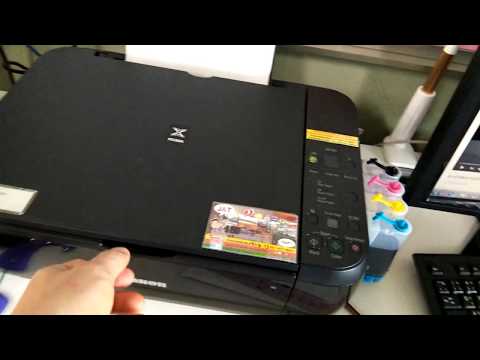
ล้างหัวพิมพ์ และปริ้นทดสอบ canon MP287
วิธีการดูแลรักษาเครื่องพิมพ์แบบต่อแทงค์
ให้สามารถใช้ได้นานๆ
ก็ต้องพยายามปริ้นทุกวัน นะคับ
คลิปนี้จะสอนวิธีล้างหัวพิมพ์ และปริ้นทดสอบ
โดยไม่ต้องเปิดคอม แค่กดปุ่มบนเครื่องปริ้น ก็พอแล้ว
288 23

Canon Pixma G2010, Visual user manual, First Setup, before use tips and tutorial
I have made a different Canon G2010 unboxing and first setup tutorial video for everyone who want to know details before use the product. No specs and comparison with other brands.
RPL
RPL GROUP
RPLGROUP
239 68
