How to Install a Second Drive in a 2011/2012 Mac mini with OWC's Data Doubler
Март 7, 2017
This video has been updated! Please view the latest version at: https://youtu.be/KlR-RWtqzis
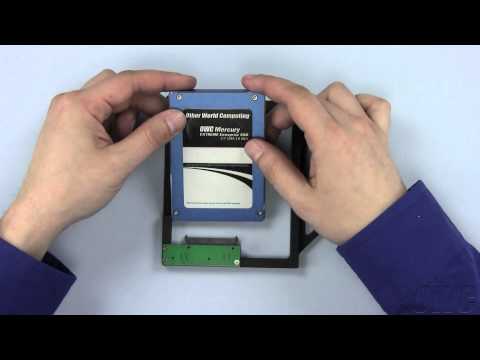
Step-by-step video of how to install an second drive with an OWC Data Doubler in the Apple Mac mini 2011 & 2012 with Model ID: Macmini5, 1 ; Macmini6, 1; & Macmini6, 2.
OWC 'Data Doubler' 2.5" Hard Drive/SSD Installation Kit http://eshop.macsales.com/item/OWC/DIYIMM11D2/
Compatible 2.5" SATA Hard Drives & Solid State Drives:
http://eshop.macsales.com/shop/hard-drives/2.5-Notebook/SATA/9.5mm
Tools Used in the video:
http://eshop.macsales.com/item/Newer Technology/TOOLKIT11/
http://eshop.macsales.com/item/Apple/9225065/
Professional installation available:
http://eshop.macsales.com/service/Mac_and_iPod
Trade-in your original hard drive:
http://eshop.macsales.com/tech_center/support/rebates/drives.cfm
Additional Video Links:
Discharging Static Electricity: http://www.macsales.com/static
OS X & Data Transfer: http://www.macsales.com/format2011
Backup You Data: http://www.macsales.com/drive-copy
This video is brought to you by Other World Computing. Visit us at www.macsales.com for all your computer upgrade and accessory needs.
174 5
29,002 просмотров

2012 Mac Mini Ram and SSD Upgrade
Upgrade the 2012 Base Model Mac mini with 16GB Ram and 120GB Sata II SSD.
Ram: http://www.newegg.com/Product/Product.aspx?Item=N82E16820148609
SSD: http://eshop.macsales.com/item/OWC/SSDEX3G120/
UPDATE: How to install a Second Hard drive or SSD in the Mac Mini Video is Live.
http://youtu.be/LNLbc1JhLFQ
1780 59

BUY THIS INSTEAD OF THE NEW MAC MINI
As an Amazon Associate I earn from qualifying purchases.
Many people don't like my decision. Here's proof that it's right... https://youtu.be/SBJ2SWSOFiI
Get a Mac Pro here... http://geni.us/vGgg0
Get a Mac Mini here... http://geni.us/tgAac
Get Peter von Panda gear here... https://teespring.com/stores/petervonpanda?aid=marketplace&tsmac=marketplace&tsmic=campaign
Get Peter von Panda apparel here... https://petervonpanda.storenvy.com
Get a travel deal at Expedia here... http://www.anrdoezrs.net/click-8839272-13455984
Get a deal on an airport hotel where you can park your car during your trip... http://www.jdoqocy.com/click-8839272-11333443
Need a quick loan? http://www.jdoqocy.com/click-8839272-13060609
Get cool products at Brookstone here... http://www.jdoqocy.com/click-8839272-133667
With a variety of ports, Mac mini is ready for a variety of workflow configurations. Thunderbolt 3 is our most powerful and versatile port ever — and Mac mini has four of them. The new HDMI 2.0 port delivers more bandwidth than its predecessor, so you can enjoy faster frame rates.
The Mac mini (marketed and branded with lowercase "mini") is a small desktop computer case manufactured by Apple Inc. One of four desktop computers in the current Macintosh lineup, along with the iMac, Mac Pro, and iMac Pro, it uses many components usually featured in laptops to achieve its small size.[5] The current Mac mini, introduced in October 2018, is the fourth generation of the product.
First released in 2005, the Mac mini is Apple's only consumer desktop computer since 1998 to ship without a display, keyboard, or mouse. Apple initially marketed it as BYODKM (Bring Your Own Display, Keyboard, and Mouse), [6] pitching it to users switching from a traditional Windows PC.[7] In 2010, a third-generation Mac mini became Apple's first computer with an HDMI video port to connect to a television or other display, more readily positioning the unit as a home theater device alternative to the Apple TV.[8]
A server version of the Mac mini, bundled with the Server edition of the OS X operating system, [9] was offered from 2009 to 2014.[10]
1376 487
13-inch MacBook Late 2009 & 2010 Data Doubler 2nd Hard Drive/SSD Installation Video
OWC's step-by-step video of how to install the OWC Data Doubler in the Apple MacBook 13-inch Unibody Late 2009 with Model ID: MacBook6, 1 & MacBook7, 1.
OWC 'Data Doubler' 2.5" Hard Drive/SSD Installation Kit
http://eshop.macsales.com/Search/Search.cfm?Ntk=Primary&Ns=P_Popularity|1&Ne=5000&N=7854&Ntt=data doubler
Compatible 2.5" SATA Hard Drives & Solid State Drives:
http://eshop.macsales.com/shop/hard-drives/2.5-Notebook/SATA/9.5mm
Tools Used in the video:
http://eshop.macsales.com/item/Newer Technology/TOOLKIT11/
http://eshop.macsales.com/item/Apple/9225065/
Professional installation available:
http://eshop.macsales.com/service/Mac_and_iPod
Trade-in your original hard drive:
http://eshop.macsales.com/tech_center/support/rebates/drives.cfm
Additional Video Links:
Discharging Static Electricity: http://www.macsales.com/static
OS X & Data Transfer: http://www.macsales.com/format2012
Backup Your Data: http://www.macsales.com/drive-copy
This video is brought to you by Other World Computing. Visit us at www.macsales.com for all your computer upgrade and accessory needs.
99 2

2012 Mac mini - Still running strong in 2017 - Review after 5 Years
A very long-term review of my high-end 2012 Mac mini (2.6 GHz Intel Core i7, 16 GB RAM, 1 TB Fusion drive). Even after 5 years of heavy use, the small (and cheapest) desktop Mac is still capable of relatively smooth 4K video edits in Final Cut Pro X in 2017.
Blog post:
https://darcerstech.wordpress.com/2017/05/28/2012-mac-mini-still-ticking-strong-in-2017-long-term-review/
The gear I use: https://kit.com/darcer
324 12

How to Clone Mac OS X to new HDD or SSD
UPDATED Video HERE ( no background musin better audio ) https://www.youtube.com/watch?v=-3zhf9IWDBw&t=1s
How to clone Mac OS X El Capitan to other/new HDD or SSD. Also this method work with other OS X versions and will make your disk Bootable. Cloning disk will save all your files, apps, games, personal settings.
Cloning recovery partition is optional. But it's recommended to Clone.
IMPORTANT!!!
During Disk Clone process DO NOT make any changes in OS X such deleting files, make other settings, using apps and games.
Just let your Computer to finish with Disk Cloning.
If have some question post a comment.
Subscribe! (it's free!)
✔ Subscribe
https://www.youtube.com/user/MonikaaCat
✔ Facebook
https://goo.gl/NFczpF
✔ Twitter
https://twitter.com/CatAndAndreW
✔Instagram
https://www.instagram.com/catandandrewhacks
Carbon Copy Cloner
https://bombich.com/
Download Multibeast
http://www.tonymacx86.com/
Visit our channel for more videos and tutorials.
Music by NCS:
https://www.youtube.com/user/NoCopyrightSounds
Song: Killercats — Tell Me (feat. Alex Skrindo) [NCS Release]
https://www.youtube.com/watch?v=besNDPvEwQw
Connect with NCS:
Snapchat: ncsmusic
• http://soundcloud.com/nocopyrightsounds
• http://instagram.com/nocopyrightsounds_
• http://facebook.com/NoCopyrightSounds
• http://twitch.tv/nocopyrightsounds
• http://twitter.com/NCSounds
• http://bit.ly/SpotifyNCS
Killercats
• https://soundcloud.com/kcatsofficial
• https://www.facebook.com/kcatsofficial/
• https://twitter.com/kcatsofficial
Alex Skrindo
• https://soundcloud.com/alex-skrindo
• https://www.facebook.com/AlexanderSkr...
• https://twitter.com/AlexSkrindo
1574 150

The Quietest Mac Ever Made!
Parts list and build guide: http://snazzylabs.com/article/the-quietest-mac-ever
Giveaway entry: http://snazzylabs.com/article/the-quietest-mac-ever
Giveaway PC ships with a licensed copy of Windows 10 and not macOS.
After Snazzy Labs' successful video from last year where we built a $682 Hackintosh that crushed Apple's Mac mini, we decided to create another macOS PC build that would be even better. We decided to build the quietest computer ever. We built Sherlock. It's a hackintosh that runs macOS, Final Cut, Premiere, etc. It looks like Apple's famous G4 cube, and does everything Apple's computers do for a fraction of the price—all without making a single noise. iMac vs hackintosh? 2016 MacBook Pro vs quietest computer ever? You betcha.
14582 588

Mac Mini 2014 Review: A Terrible Shame
Support me on Patreon: http://ow.ly/3ymWFu
Previous Video: http://ow.ly/3teqXT
Help Support My Channel. PayPal Donations Welcome. Click here: http://goo.gl/NSdOvK
Sign up to our Monthly Newsletter to receive exclusive FREE Computing Forever video and blog content:
http://goo.gl/YKq7ZK
SUBSCRIBE TO THIS YOUTUBE CHANNEL: https://www.youtube.com/user/LACK78
KEEP UP ON SOCIAL MEDIA:Twitter : http://twitter.com/lack78Facebook : https://www.facebook.com/ComputingForever
Google : LACK78: http://goo.gl/k4gWsg
Google : Computing Forever: http://goo.gl/Q8gZpY
ALL MY TECH BLOGGING NEWS CONTENT:http://computingforever.com
MORE VIDEO AWESOMENESS:
http://youtube.com/daveknowsstuff
9301 905

Introducing the Mac mini Pro (recorded before the 2018 Mac mini)
What would it take for Apple to update the Mac mini to a modern, professional level machine? According to David Gewirtz, not much.
For more information, see the accompanying article:
https://www.zdnet.com/article/introducing-the-mac-mini-pro/
647 87

Which Mac Should I buy 2018?
helping you decide Which Mac is right for you? Should you Get the Imac? Mac Pro or the Mac mini? I WILL REPLY TO ALL COMMENTS.
I review all three desktops in one video giving you the insight you need to decide on which mac desktop you want to buy. I'm sure you guys have tons of questions comment below and lets have a open discussion!
Buy Games For 40-60% Off using
This link: https://www.g2a.com/r/user-serge ................................................................................................................
The Mac Mini 350 USD
Purchase link:
http://amzn.to/2cKQNb1
Most affordable mac its going to be the mac mini which ranges from 350-1300 USD. It can do just about any computing tasks except its somewhat slow. But if you need to do homework, surf the web or reply to some emails The Mac mini Is for Price sensitive customers who want to enter the mac world with out breaking the bank.
Gaming Review: Some light gaming on TeamFortress 2, League of Legends or Counter-strike along with some GTA5 the Mac mini will be able to play all those games, not perfect but it can maintain 25-80 FPS on 1280x800 with the HD 6000 model or if you can opt for the iris model and the oldest model that can play games is the HD4000 model originally released in 2012. Thats the version with easy ram and storage upgrades, its shame they made this process more difficult by soldering the back plate.
Its small and portable enough to not be noticed or herd and can be a great media center pc in the living room or bedroom.
I bought this Mac Mini for my mom! ................................................................................................................
The Imac 5k, 4k, 27 inch or 21.5 inch Starts at 1000 USD
Purchase Link:
$999 USD
$1900 USD
$4200 USD
http://amzn.to/2cj8OeK
http://amzn.to/2cNDWrl
http://amzn.to/2c15XeO
Want the best Value computer? This Imac is an all in one solution. This means the Screen and the tower are built into each other. The speakers are also built in. The keyboard and mouse are included unlike the mac mini or mac pro. This is the machine you wanna get if you want an extremely clean set up with as little wires and space taken up as possible!
Gaming Review: This Imac can play any modern game with 60-80 FPS on high-Ultra Graphics at 1080p or 1440p depending on the game and configuration. I personally opted for the m395x graphics card in my imac because I knew I wanted to game, if your a big gamer grab this card its going to be very important for your gaming needs!
Personally this is my favorite computer!................................................................................................................
The Mac Pro 3000
Purchase Link:
$2200 USD
$2700 USD
$6500 USD
http://amzn.to/2cKTusX
http://amzn.to/2c5tXfj
http://amzn.to/2cMZJRe
Want the fastest computer Apple has to offer? Well be prepared to pay a lot of money for that extra 5-50% performance. This Mac Pro runs on Xeon Processors and can be configured with a 12 core CPU and a 20 core experimental model CPU if you find one on ebay or amazon. its max ram is 64GB at 1866mhz and a 1TB SSD for storage. Its equipped with duel video cards each can be a 2gb, 3gb and 6gb Vram per card, each card is a AMD fire Pro D300, D500 or D700.
This computer is designed for business professionals or hardware enthusiast that demand there computers CPU to have more cores. Designed for multithreaded application processing, for video editing or 3d rendering. this Mac's AMD Fire Pro cards have a lot of stream processors and a big amount of customizable Vram that allow for faster rendering of videos or compiling of 3d renders.
Gaming on Mac Pro: You wont have problems gaming on the Mac Pro throw any game at it and it will play pretty good including Grand theft auto, LOL and CS:GO. But if your really gonna get this model grab the D700 or D500 graphics as it will go a long way in future proofing your Mac Pro. Hold off on the extra cores because more cores will slow your gaming experience down since your GHZ speeds will drop to 2.2ghz and possibly lower when thermal throttling kicks in during intense moments.
If I could afford a maxed out model I would get one, perhaps its best to grab the cheapest model and swap out parts for a better hardware down the line as this mac is very upgradable! this would be my first pick but its expensive!
Mac Pro grab the base model for 2200 on ebay or amazon than grab a RAM, CPU upgrade kit for 1500 and get close to maxing out your imac under 4 grand. ............................................................................................................
Closing thoughts. These Macs are for different people, all of them do the same thing but some are faster, if you want basics grab the Mac Mini, if you want power and lots of value and your willing to spend a little more grab the imac all in one. Ultimate performance? grab a Mac Pro!
Help me build a better channel!
Sub!
2751 532

How to Upgrade the Main Drive in a 27-inch iMac (2012 – Current)
We show you how to expand the capability of the your 27-inch iMac with a larger and faster hard drive, or step up to the ultimate performance upgrade with an OWC SSD.
Video Jump Points:
00:00 – Title, Difficulty Level, and Notes
00:12 – Introduction
01:46 – Part 1 – Removing the Original Hard Drive
05:10 – Part 2 – Preparing the New Hard Drive
07:07 – Part 3 – Installing the New Drive
08:02 – Reinstalling the Display
10:40 – Final Notes and Closing
Upgrade Your 27-inch iMac with Confidence
OWC's in-line solution is the only hardware digital thermal sensor on the market allowing a third-party SATA drive to be installed in your iMac. A convenient, plug-and-play cable, the In-line Digital Thermal Sensor eliminates fan noise and maintains proper system fan control through the iMac's System Management Controller. This innovative device is designed specifically for the iMac, requires no software hacks and ensures compatibility with Apple's built-in diagnostic processes.
iMac Upgrade Toolkits
https://eshop.macsales.com/shop/imacdiy
SSD Upgrade Options for iMac:
https://eshop.macsales.com/shop/ssd/owc/imac
3.5-inch Hard Drives:
https://eshop.macsales.com/Search/?q=3.5" hard drive&filter.catidpath=4081&sort.popularity=desc
Compatibility:
This install video can be used to guide you through upgrading the main drive bay in the following 27-inch iMac models:
— 27-inch iMac, Late 2012 with Model ID: iMac13, 2 — 27-inch iMac, Late 2013 with Model ID: iMac14, 2 — 27-inch iMac, Late 2014 / Mid 2015 with Model ID: iMac15, 1 — 27-inch iMac, Late 2015 with Model ID: iMac17, 1 — 27-inch iMac, Mid 2017 with Model ID: iMac18, 3
162 4
