How To Record Video Games with Open Broadcaster Software (OBS)
Июль 9, 2014
Whether you want to record video game play on your PC, screen capture your desktop, or combine either of them with a little window of yourself from your webcam, Open Broadcaster Software (also known as OBS) can help you do it. The best part is that Open Broadcaster Software is open source and free! In this tutorial, you'll learn all the appropriate settings to use to use Open Broadcaster Software to record your video games along with a little webcam video of yourself in the corner of the screen.
Download Open Broadcaster Software for free
https://obsproject.com/download
Check out Nathie on YouTube
http://www.youtube.com/user/nathie944
On Video Creators we discuss how to leverage YouTube as a social platform and use it to build an audience, spread our message, and change lives. If you're a YouTuber or an online video creator, we'd love to have you subscribe and join us!
SUBSCRIBE!
http://www.youtube.com/subscription_center?add_user=videocreatorstv
FREE EBOOK: "The Secret to Building your YouTube Audience"
http://videocreators.com/resources/secret-building-youtube-audience/
THERE'S MORE GOODNESS FOR YOU HERE
YouTube: http://www.youtube.com/user/videocreatorstv
Website: http://videocreators.com
iTunes: https://itunes.apple.com/us/podcast/videocreators.com-youtube/id649667452
T-Shirts: http://videocreators.com/resources/video-creators-t-shirts/
SCHEDULE
— Tuesdays: YouTube and Online Video News —
http://www.youtube.com/playlist?list=PLvxDZJe1lbabcEjD8qZWIDv-pyBXz1snW
— Wednesdays: YouTube Tips, Tricks, Advice and Ideas —
http://www.youtube.com/playlist?list=PLvxDZJe1lbaaEfLsIhbhQpoJRCcAyi4MC
— Thursdays: Questions & Answers —
http://www.youtube.com/playlist?list=PLvxDZJe1lbabPKJuXL3PTeP3fPQrEaGSz
— Monthly: Google Hangouts —
http://www.youtube.com/playlist?list=PLvxDZJe1lbabxmw1Hrktw1BOE64QgNd_G
LET'S CONNECT!
VideoCreatorTV's accounts
— http://www.facebook.com/videocreators
— http://www.google.com/ videocreators
— http://videocreators.tumblr.com
— http://www.pinterest.com/videocreators/
— http://www.linkedin.com/company/video-creators
Tim Schmoyer's personal accounts
— http://www.google.com/ timschmoyer
— http://www.facebook.com/timschmoyer
— http://twitter.com/timschmoyer
— http://instagram.com/timschmoyer
OTHER CHANNELS I'M A PART OF
ReelSEO: http://www.youtube.com/reelseo
Family Vlogs: http://www.youtube.com/schmovies
13199 520
777,792 просмотров

Full Basic Setup Guide for OBS (Open Broadcaster) | Beginner Tutorial
Learn GIMP For Beginners 50% Off ►► http://bit.ly/LearnGIMPHalfOff
◢◤◣◥◢◤◣◥◢◤◣◥◢◤◣◥
Here's my complete guide for getting started in OBS. You will be able to record video in OBS by the end of this full tutorial for beginners.
My Full Video Courses ►► http://bit.ly/christutorialscourses
More Tutorials ►► http://christutorials.com/
♕My Setup ♔
Premier CC http://bit.ly/GetPremierCC
Photoshop CC http://bit.ly/GetPhotoshopCC
Lenovo IdeaPad Y510p http://amzn.to/2gBqckY
Blue Yeti USB Microphone — Silver http://amzn.to/2fH8Oqt
Logitech HD Pro Webcam C920 http://amzn.to/2gBregR
GIMP http://bit.ly/DL_GIMP
Visual Studio 2017 http://bit.ly/VS2017_RC
Unity Beta 5.5 http://bit.ly/UnityBetaDL
➣ Also Follow Me On
Minds ►►https://www.minds.com/ChrisTutorials
Vid.Me ►►https://vid.me/ChrisTutorials
DailyMotion ►►http://www.dailymotion.com/christutorials
2419 120

OBS Studio Best Settings 2016 - How To Record PC Games (TUTORIAL)
THIS TUTORIAL IS NO LONGER VALID!!
*NEW UPDATED TUTORIAL 2018*: https://www.youtube.com/watch?v=Rb1tdDyezac&feature=youtu.be
In this video I'm going to explain to you guys how I currently set up OBS Studio in order to record 1080p 60fps high quality gameplay with minimum performance hit!
If you enjoy the video, please leave a like and a comment below. Be sure to share the video with your friends and subscribe for more awesome videos.
• Earn Money From Youtube — http://www.unionforgamers.com/apply?referral=uiqcbyltgt0qxp
• Subscribe — http://bit.ly/SubToFourEyes
• Follow me on Twitter — https://twitter.com/iFourEyesYT
• My Twitch Stream — http://www.twitch.tv/foureyesgames
Production Music courtesy of Epidemic Sound: http://www.epidemicsound.com
3936 515

How To Grow with 0 Views and 0 Subscribers
If you have a brand new YouTube channel with absolutely no views and no subscribers, getting a little bit of traction can be frustrating. Here's a few tips on how to get your channel's first viewers and subscribers. With some effort and valuable video content, your channel should begin to grow and, before you know it, your videos will grow to thousands of views!
CHECK OUT DERRAL EVES
http://www.youtube.com/derraleves
————————————-
Learn how to brand your channel to convert more viewers to subscribers: https://www.youtube.com/playlist?list=PLvxDZJe1lbaZQgDs_PuUiBiBcDTCNWdcB
VIDEOS ABOUT GROWTH
How To Grow a YouTube Channel through Collaborations
http://www.youtube.com/watch?v=PfaAREGAsu8
The #1 Best Thing You Can Do for your Video SEO
http://www.youtube.com/watch?v=m2-wB9Ua1j0
7 Factors that Convert Viewers into a Raving Fan Base
http://www.youtube.com/watch?v=YQ0BANmR2J8
3 Traits of a Highly Subscribable Channel
http://www.youtube.com/watch?v=7cJ7zse6UHg
How To Hook Viewers to Watch your YouTube Videos
http://www.youtube.com/watch?v=mswUessX7Ns
Advice for Improving YouTube Audience Growth
http://www.youtube.com/watch?v=RPzDYKYO_No
Top Elements that Affect a YouTube Channel's Growth
http://www.youtube.com/watch?v=OxMGjpkotZ4
2 Strategies that Convert Viewers into Subscribers
http://www.youtube.com/watch?v=QC-TGJrSCaI
How To Turn Viewers into Subscribers on YouTube
http://www.youtube.com/watch?v=Bi8gmxBmChk
————————————-
VIDEOS ABOUT INCREASING WATCH TIME
Are There Tricks that Increase Watch Time?
http://www.youtube.com/watch?v=JUmOqmr77G8
How To Hook Viewers to Watch your YouTube Videos
http://www.youtube.com/watch?v=mswUessX7Ns
5 Tips for Increasing Audience Retention
http://www.youtube.com/watch?v=FNr5S_luIwI
Optimizing Video SEO for Reach vs. Retention
http://www.youtube.com/watch?v=erfgDfzPILo
Does Video Length Affect Subscriber Growth?
http://www.youtube.com/watch?v=Gj3xCPNdyl8
How To Fix Audience Retention on Older Videos
http://www.youtube.com/watch?v=CgD9fknDDA0
————————————-
SUBMIT YOUR VIDEO QUESTION
1. No music nor sound effects.
2. No text nor logos.
3. Keep it brief.
4. Include your name and channel URL in the "message" field.
5. Upload your video here: https://www.wetransfer.com/[email protected]
On Video Creators we discuss how to leverage YouTube as a social platform and use it to build an audience, spread our message, and change lives. If you're a YouTuber or an online video creator, we'd love to have you subscribe and join us!
SUBSCRIBE!
http://www.youtube.com/subscription_center?add_user=videocreatorstv
FREE EBOOK: "The Secret to Building your YouTube Audience"
http://videocreators.com/the-secret-to-building-your-youtube-audience/
My ebook, "30 Days to a Better YouTube Channel, " is out! You can find it here: https://courses.videocreators.com/courses/30-days-to-a-better-youtube-channel
THERE'S MORE GOODNESS FOR YOU HERE
YouTube: http://www.youtube.com/user/videocreatorstv
Website: http://videocreators.com
iTunes: https://itunes.apple.com/us/podcast/videocreators.com-youtube/id649667452
T-Shirts: http://videocreators.spreadshirt.com
SCHEDULE
— Tuesdays: YouTube and Online Video News —
http://www.youtube.com/playlist?list=PLvxDZJe1lbabcEjD8qZWIDv-pyBXz1snW
— Wednesdays: YouTube Tips, Tricks, Advice and Ideas —
http://www.youtube.com/playlist?list=PLvxDZJe1lbaaEfLsIhbhQpoJRCcAyi4MC
— Thursdays: Questions & Answers —
http://www.youtube.com/playlist?list=PLvxDZJe1lbabPKJuXL3PTeP3fPQrEaGSz
— Monthly: Google Hangouts —
http://www.youtube.com/playlist?list=PLvxDZJe1lbabxmw1Hrktw1BOE64QgNd_G
LET'S CONNECT!
VideoCreatorTV's accounts
— http://www.facebook.com/videocreators
— http://www.google.com/ videocreators
— http://videocreators.tumblr.com
— http://www.pinterest.com/videocreators/
— http://www.linkedin.com/company/video-creators
Tim Schmoyer's personal accounts
— http://www.google.com/ timschmoyer
— http://www.facebook.com/timschmoyer
— http://twitter.com/timschmoyer
— http://instagram.com/timschmoyer
OTHER CHANNELS I'M A PART OF
ReelSEO: http://www.youtube.com/user/reelseo
Family Vlogs: http://www.youtube.com/user/godrox
118377 8349

Top 5 Mistakes New Streamers Make!
Learning from your mistake is one of the best ways to refine and grow your stream on Twitch, YouTube & Mixer.
If you want to become a better streamer on Twitch, YouTube and Mixer, you need to start making positive changes that will enhance your stream quality. This video will cover common mistakes that mostly every new stream does that can be easily fixed. Make these changes and you will start to see more growth on all streaming platforms. This video is perfect for any Twitch, YouTube or Mixer streamer looking to grow and refine there stream channel.
Thanks for the Tip Pr1mal1nstincts:
https://www.twitch.tv/pr1mal1nstincts
Enjoy!
#supportsmallstreamers #twitchstreaming #twitchstreamers #streamsupport #wild4games
_________________________________________________________________
⭐ Helpful Links ⭐
🔷 Twitch Creator Camp: https://www.twitch.tv/creatorcamp/en/
🔷 What To Do After Twitch Affiliate!: https://youtu.be/AsW9as2C__k
🔷 Twitch Affiliate Growing Tips: https://youtu.be/6PZxJsBIXig
🔷 Super Fast Growth On Twitch: https://youtu.be/ugekaUl4eOo
🔷 Canva.com: https://www.canva.com/
🔷 Fiverr Twitch Store: https://track.fiverr.com/visit/?bta=40336&brand=fiverrcpa&landingPage=https://www.fiverr.com/stores/twitch
_________________________________________________________________
⭐ YouTube Video Gear Used ⭐
📷 Canon SL2 Camera: https://amzn.to/2JxOE2r
🎙 TakStar SGC-598 Mic: https://amzn.to/2GLf1UL
💡 Neewer LED Ring Light: https://amzn.to/2HbrxZT
💡 Fancierstudio Lights & Green Screen: http://amzn.to/2jQSDJv
🎞 Adobe Premiere Pro (Editing Software): https://amzn.to/2zh2SkH
🔗 Tubebuddy: https://www.tubebuddy.com/Wild4Games
_________________________________________________________________
⭐ Wild4Games on Social Media ⭐
🎮 Twitch: https://www.twitch.tv/wild4games
🐦 Twitter: https://twitter.com/Wild4Games
📷 Instagram: https://www.instagram.com/wild4games
📺 YouTube: http://www.youtube.com/c/wild4games
_________________________________________________________________
💸 Support The Channel 💸
Donations are not required but are greatly appreciated! All donations will go to supporting the streams and future videos.
💸YouTube Membership: https://www.youtube.com/channel/UCOy7wLmQZUFkin51jcSxR3A/join
💸Subscribe On Twitch: https://www.twitch.tv/products/wild4games/ticket
💸Patreon: https://www.patreon.com/Wild4Games
💸Donation Support: https://twitch.streamlabs.com/wild4games
_________________________________________________________________
DISCLAIMER: This video and description contain affiliate links, which means that if you click on one of the product links, I’ll receive a small commission. This helps support my channel and allows me to continue to make videos like this. Thank you for the support!
14747 789

HOW TO PRODUCE NATURAL DMT - Mantak Chia | London Real
LATEST EPISODE: https://londonreal.link/latest
NEW MASTERCLASS EACH WEEK: http://londonreal.tv/masterclass-yt
2019 SUMMIT TICKETS: http://londonreal.tv/sytd/
Master Mantak Chia is Taoist Master, author, and healer who teaches people how to empower themselves through the cultivation of their “chi” energy.
This is his third appearance on London Real and last time he performed my Chinese Astrology reading, and we discussed the 5 elements of Fire, Earth, Metal, Water and Wood, and how they directly related to my personal energy.
On this episode I went to dive deeper into the philosophy of Taoism, learn about dark room therapy, taoist nutrition and fasting, and of course we will revisit our favourite subject — sex and sexual energy.
Watch the FULL EPISODE here: https://londonreal.tv/e/mantak-chia/
MANTAK CHIA
Twitter: https://twitter.com/MantakChia
Website: https://www.universal-tao.com/
About London Real:
Founded by Brian Rose in 2011. London Real is the curator of people worth watching. Our mission is to promote personal transformation through inspiration, self-discovery and empowerment.
We feature interesting guests with fascinating stories and unique perspectives on life. We aim to take viewers on a journey through the lives of others and ultimately inspire them to embark on one of their own.
Don't miss our weekly episodes, hit subscribe: http://bit.ly/SubscribeToLondonReal
Website: http://www.londonreal.tv
Facebook:https://www.facebook.com/LondonReal/
Instagram:https://www.instagram.com/therealbrianrose
Twitter: https://twitter.com/LondonRealTV
iTunes: https://itunes.apple.com/gb/podcast/london-real/id474722933
Medium: https://medium.com/@LondonReal
London Real Academy:
BUSINESS ACCELERATOR: https://londonreal.tv/biz
LIFE ACCELERATOR: https://londonreal.tv/life
BROADCAST YOURSELF: https://londonreal.tv/by
SPEAK TO INSPIRE: https://londonreal.tv/inspire
TRIBE: Join a community of high-achievers on a mission to transform themselves and the world! https://londonreal.tv/tribe
20974 492

How to play mobile games without getting caught!
How to create the ultimate stealth gaming system for work or class. Pull this off with items from around your house!
Free Audible Download: http://audible.com/household
All you need for this project is a thick notebook, glue, and a blade for cutting. You need to mix the blue with water on a one to one ratio and stir it up good. After that, apply a coat of the glue to a portion of your notebook. Now we need to cut a slot out for the mobile device, this takes awhile but it is worth the result.
Follow the video and see how it all done... most importantly, enjoy.
Here are my links:Facebook: http://facebook.com/dylanhackerTwitter: http://twitter.com/householdhacker
Biz inquires? [email protected]
68224 2351

How To Record Your Computer Screen For FREE 2018! (2019 TUTORIAL IN DESCRIPTION)
🔴 2019 UPDATED TUTORIAL ►
https://youtu.be/Esu0HaPD8nc
📹 2018 Best OBS Recording Settings ► https://www.youtube.com/watch?v=m3dYc-Qbh-8
📹 2018 Best OBS Streaming Settings ► https://www.youtube.com/watch?v=alw_Op4hyw0
Hey guys, it's Muaaz! Here's an updated video on How To Record Your PC Screen For Free in 2017! To summarize the following video, I'm going to be teaching you how to record your computer or desktop screen for free! Whether you wanted to know how to record just your monitor or capture the whole screen, a gaming video or tutorial, this video will cover the best way to record your screen with Open Broadcaster Software or OBS. I made this video because my other tutorial for this is pretty outdated and OBS has made quite a lot of updates since then. So I only felt it would be right for me to make an updated version of the old video because everyone enjoyed it so much. This is sure to work in 2016 and is guarenteed to work in 2017! If you want an Open Broadcaster Software tutorial that goes more in depth in regards to the advanced output mode then please let me know in the comments! Thanks and enjoy! :D
😃 SUBSCRIBE ► http://bit.ly/SubToMuaaz
🔴 OBS ► https://obsproject.com/
*FOLLOW ME ON SOCIAL MEDIA! *
🐦 TWITTER ► https://twitter.com/mws
📷 INSTAGRAM ► https://instagram.com/mxaaz
👥 DISCORD SERVER ► https://discord.gg/muaaz
🎮 MY STEAM ► https://steamcommunity.com/id/muaaaz/
🎭 FACEBOOK ► https://www.facebook.com/MuaazYT
👻 SNAPCHAT ► Muaaz
Click Here to Customize Your Own PC: https://ironsidecomputers.com/
► Music:
● Background Music: Konac — Home
● Intro Music: Nav x Metro Boomin — Up (Instrumental)
● Intro Designer: https://www.youtube.com/c/dBgraphicslol
I can't say this in every video but if you've read this far down the description, I just wanted to say that I appreciate each and every single one of you who take time out of your day to watch even a minute of my family friendly pg clean videos, it truly does mean a lot. Thank you so much!
27694 1016
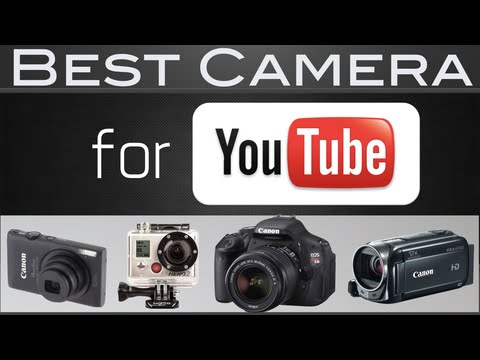
What is the Best Camera for YouTube?
Best camera for YouTube videos 2014
View the blog post! ► http://channelempire.com/best-camera-for-youtube
My YouTube gear: http://channelempire.com/resources
With so many options it seems difficult to find the best camera for YouTube. Don't fret. I got ya. During my YouTube life I've gone through a handful of cameras. I've come up with 3 categories of cameras to help you find the best camera for your YouTube videos. The baseline criteria for all of the cameras I recommend is simple: they all have to be capable of shooting full HD 1080p.
Category 1: Low Budget or No Cost
If you have less than $100 to spend I'd recommend an HD webcam such as the Logitech C920 http://amzn.to/1oOyE9d. It will suffice until you can upgrade to a "real" camera from Categories 2 or 3. If you don't want to spend money on a camera then you'll have to use something you already own: most likely your smartphone (or an iPod Touch). Almost everyone has an iPhone or Android smartphone, and if you've gotten it within the past couple years then it should be able to shoot full HD 1080p video. If you plan to record YouTube videos with your smartphone here is a list of things you'll want to have:
Video app such as Filmic Pro https://itunes.apple.com/us/app/filmic-pro/id436577167
GorillaPod ► http://amzn.to/1mm00Cd
Square Jellyfish mount ► http://amzn.to/1suXyBm
Pros: Portable, Easy to use, No additional cost. Cons: Not the best audio, Can't see yourself, Uses phone's battery & storage space. All in all, you can record some pretty nice looking HD videos for YouTube with your smartphone.
Category 2: $250-$400 Cameras
If you have a budget for a new camera but don't want to break the bank then I recommend any of these cameras:
Canon PowerShot ELPH 300 ► http://amzn.to/1rl9Uvw
GoPro Hero3 ► http://amzn.to/WfL2bN
Canon Vixia HF R500 ► http://amzn.to/1suF047
Pros: Extremely great quality for the price, Compact, Easy to use. Cons: Not the best audio, Lack ability to fully customize shots. These cameras are great for beginner YouTubers, vloggers, and people on a budget who don't want to spend a lot of money on a higher quality camera yet. Great for capturing that full HD footage that you really need for YouTube these days. If you want an affordable camera with that sharp 1080p video quality then any of these is a no-brainer.
Category 3: $500 DSLR & Mirrorless Cameras
Do you want the best video quality possible? Do you have a nice chunk of change to spend on a camera? Take a look at any of these:
Canon Rebel T3i ► http://amzn.com/B004M170YC?tag=cempire-20
Nikon D5200 ► http://amzn.to/1tXnyqT
Panasonic Lumix GH4 ► http://amzn.to/1r4mLlV
Canon 70D ► http://amzn.to/1p1i2Or
Canon 5D Mark III ► http://amzn.to/1pfYzIw
Pros: Best video quality, Fully customize your shots, Interchangeable lenses, Professional-looking videos
Cons: Can be expensive, Learning curve. With these DSLR's and mirrorless cameras you can get stunning professional-quality HD videos. If you've never used a DSLR it may take a little while to learn about all the different settings. But once you start practicing you'll get the hang of it pretty quickly and realize that it's not as complicated as you may think. So if you want the best quality video and you have the budget for it then I would definitely recommend getting any of these DSLR or mirrorless cameras.
Figure out what your budget is and see what category your budget falls under. Once you find your category then click on each camera link and read the reviews, find out the specs, and see which one you'd personally like the best for your YouTube videos.
All these cameras shoot full HD 1080p video, and that's really all you need. However, it is highly recommended that you invest in some other gear to get the most out of your camera. Audio is 1/2 of video, and on YouTube it's essential to get great sounding audio. Also nobody likes a shaky camera. How to fix this? Get a tripod and an external microphone. If you get any of these cameras, try to get a microphone and tripod along with it. Here are some I recommend:
Rode VideoMic Pro ► http://amzn.to/1nQFUVP
Zoom H1 audio recorder ► http://amzn.to/UdPq9A
Magnus VT-4000 tripod ► http://amzn.to/1tbg9js
These are all affordable options that can make a huge difference for your YouTube videos. It's not all about video quality. The most important thing is you just get started recording videos. Take action & work with what you have. But if you have the budget for a camera and gear it is highly recommended to get the best quality possible for your videos. I hope this helped you find the best camera for YouTube! Share this video: http://youtu.be/jnYR-ED3Zt0
7038 273

Video Editing (for non-editors)
Welcome to the Complete "How-to" guide to VIDEO EDITING for NON-EDITORS!
Video Editing (for non-editiors): http://www.jameswedmore.com/ytmktgm01/
If you're a business owner, but editing is super difficult for you.. stay tuned! I show you how it's simple, easy, and painless in this short video. The quicker you can go from idea, to implementation the faster the process.
The basic cut is the section you want to remove, and allows you to string your video better.
The jump cut is when you actually paste one clip with another.
There's so many options and simple tools that make editing SUPER easy, and most importantly: FUN!! You don't need to do everything under the sun, you just need to separate what you want to do and what you don't.
=======================================
James Wedmore
Strategic Video Marketing Coach
http://www.JamesWedmore.com
Facebook: http://www.Facebook.com/jameswedmore2
Get the Free YouTube Traffic Report: http://www.JamesWedmore.com/get-the-report
=======================================
Video Editing :
http://www.youtube.com/watch?v=0pCI_g9dHRk
9530 1913

A Guide to Not Quitting on YouTube Dreams
Many creators start making videos for YouTube because they have a dream of some sort of what their channel could become. But too often the creator quits because they realize how difficult growing a YouTube channel can be, often right before their channel really starts to grow. For those of you who feel like you're ready to quit on your YouTube goals and dreams, here's some advice and encouragement that will give you a guide to how you can never give up nor quit on your YouTube dreams.
My Biggest Mistake on Video Creators (the original video that inspired this one)
https://www.youtube.com/watch?v=RgneE0CoZBM
LIVE: Encouraging you through "the dip" of being a creator
https://www.youtube.com/watch?v=maYJoiO66xw
The Complete Guide to Never Quitting Anything Again
http://thenextweb.com/lifehacks/2015/10/10/the-complete-guide-to-never-quitting-anything-again/
Video Labs
https://videocreators.com/product/video-labs/
SUBSCRIBE!
http://www.youtube.com/subscription_center?add_user=videocreatorstv
FREE EBOOK: "The Secret to Building your YouTube Audience"
https://videocreators.com/product/secret-building-youtube-audience/
SUPPORT: Many bonus perks for those who become a patron of Video Creators!
http://www.patreon.com/videocreators
LET'S CONNECT!
Video Creators
— http://www.facebook.com/videocreators
— http://www.google.com/ videocreators
— http://videocreators.tumblr.com
Tim Schmoyer
— http://www.google.com/ timschmoyer
— http://www.facebook.com/timschmoyer
— http://twitter.com/timschmoyer
— http://instagram.com/timschmoyer
MY FAMILY'S VLOGGING CHANNEL
http://www.youtube.com/schmovies
4185 116
