TOP853 Memory Programmer e TopWin 6 - brevi appunti per l'utilizzo
Май 7, 2012
TOP853 Memory Programmer e TopWin 6 — brevi appunti per l'utilizzo
21 3
23,242 просмотров
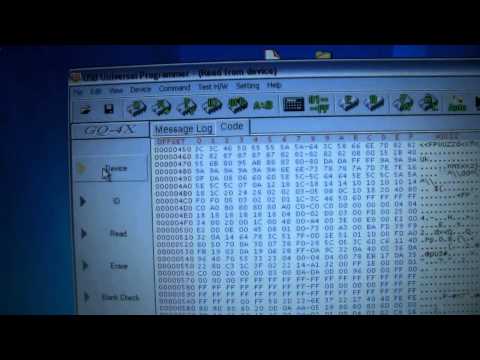
How to Read, Erase, & Write EProm EEProm Chips Electronic Fuel injection DIY Tuning GQ-4X Programmer
How to use the GQ-4X Prom Programmer when reading writing erasing eproms and eeproms.
460 27

MiniPro TL866 EEPROM Programmer Software
The MiniPro TL866 EEPROM programmer software in use.
Programming a W25X32 IC.
V5.91 Programmer software is here; http://rapidshare.com/files/196977709/minipro_setup.rar
User manual is here; http://www.mediafire.com/?ufx1kkk4jtyjove
The software link above will be updated as and when new versions are released.
Updated 5-4-13
288 51
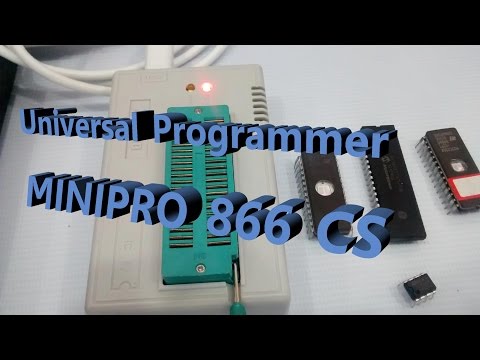
Universal Programmer MINIPRO 866 CS
MiniPro 866 Universal programmer is an excellent programmer for all PIC, AVR, 8051, EPROM & many more ICs.
This programmer works on Windows XP, VISTA, WIN7, WIN8 both 32 & 64 bits.
https://alselectro.wordpress.com/2014/11/03/universal-programmerminipro-866/
Background music Credit "Rainbow Beat" www.timbeek.com
123 8
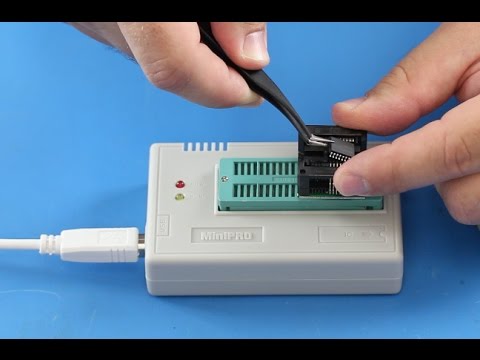
MiniPRO TL866CS USB Universal Flash EEPROM Programmer
How to use EEPROM Flash Programmer
CLICK HERE TO PURCHASE: http://www.shopjimmy.com/minipro-reg-tl866cs-usb-universal-flash-eeprom-programmer.htm
AVR series, single-chip, high speed programming
PIC series 8-bit micro controller programming
High-performance BIOS programme
Serial 24 / 25 / 35 / 45 / 93 series programming
Supports WIN2000 / WINXP / WIN2003 / WIN2008 / VISTA / Windows7
This video is designed to be a guide. Please note that other complications may exist that aren't addressed in this guide. While we always strive to provide accurate and detailed information, we can't guarantee that it will fix your TVs issues.
ShopJimmy is not responsible for any harm that you may cause to yourself or damage to your TV, during the repair process.
Try all repairs and troubleshooting at your own risk. Be sure to take all of the proper safety precautions.
In this video we will show how to use the minipro TL866CS eeprom programmer.
Here we have the box for the eeprom programmer and all of its contents along with two adapters.
In the box, you will receive a mini cd, with programming software, a USB cable to connect the programmer to your computer, nine blank eeproms, the programmer, and two adapters.
This is how to connect the USB cable to the programmer.
The other end here, connect to the USB port on your computer.
Start by flipping up the lever, then place your adapter into the slots, on the top of the programmer.
Be sure to align pin 1 as shown in the diagram on the programmer.
Once the adapter is in place push the lever down to securely lock it.
Push down on the top of the adapter to open the pin terminals.
Correctly align pin one on the eeprom according to the diagram on the programmer. Once the eeprom is aligned, use the tweezers to push down on the top of the eeprom to hold it in place, and then release the top of the adapter to create the best connection.
Open the programming software.
Choose the device to program to.
Load the file to be programmed.
Click on the programming button.
Click Program.
Programming should begin immediately.
If you receive this error, go back and reseat the eeprom in the adapter and then try again. If you receive the error 5 times, it means there could be something wrong with the actual eeprom, and you should try a different eeprom.
The yellow light on the programmer, will light up when programming.
Programming time can vary depending on the file size.
You may also receive an error halfway through the programming. At that point, that means there is something wrong with the chip and you should try a different eeprom.
Next, we will show how to read data from the eeprom, and save it to burn to a new chip.
If the chip is damaged or corrupt, you will not be able to read the original data.
Select the device you are reading from.
Click the Read from Chip button.
Click Read.
After the read is successful, click Cancel.
Click Save.
Choose a location to save the data.
Click OK, after a successful save.
TV Repair Made Easy™
© 2016 ShopJimmy.com, LLC.
923 85

SOFI Bios programmer tutorial in Hindi
in thish video i will show u how use sofi bios programmer device...
sandeep dwivedi satna M.P
-~-~~-~~~-~~-~-
Please watch: "Motorola Moto G4/G4 Plus Xt1643 F.R.P Solution in Hindi 100% Tested March 2017"
https://www.youtube.com/watch?v=XxLYKltPWMw
-~-~~-~~~-~~-~-
275 29

TL866II+ EEPROM Programmer Review
This is a more in-depth look at an TL866II I was sent by Banggood.
If you're interested in the TL866II you can get it from Banggood here:
https://www.banggood.com/TL866II-Pro-USB-BIOS-Universal-Programmer-Kit-With-9-Pcs-Adapter-p-935123.html?p=1F291422726815201806&utm_campaign=23198960&utm_content=3312
This is a very different thing for me to do and I would really like to hear feedback on how people feel about this.
If you know something about ROM dumping or the Atari 8bit computers then I would love some help on getting a working ROM out of these dumps:
ftp://akbkuku.com/videos/0r0001/ROMDUMPs.zip
Playlists of more stuff like this:
Electrical Engineering: https://www.youtube.com/playlist?list=PLJVwF78cppBhviWyq4RAr-cTDfSZ7F9LD
Live: https://www.youtube.com/playlist?list=PLJVwF78cppBgFEdxq9kql6PJiSnCBCCx6
Other Links
Youtube: https://www.youtube.com/AkBKukU
Github: https://github.com/AkBKukU
Thingiverse: https://www.thingiverse.com/AkBKukU
Patreon: https://www.patreon.com/AkBKukU
Discord: https://discord.gg/E6xgGs6
817 21
![Programming AVR with Arduino [2012]](https://i.ytimg.com/vi/_ZL-YNOH_jA/hqdefault.jpg)
Programming AVR with Arduino [2012]
[Please note: this tutorial is now 4 years old.]
Program an AVR microcontroller with an Arduino! You can use almost any Arduino/AVR combination for this tutorial (I'm using an ATtiny2313 and Arduino Duemilanove). Follow along with the datasheet of your chip. Tutorial for Windows, Mac, and Linux.
Steps:
0. Introduction 0:06
1. Upload Arduino ISP to Arduino 1:26
2. Connect AVR 1:47
3. Install AVR toolchain 4:03
4. Configure Makefile 4:52
5. Write main.c 6:25
6. Upload code to AVR 8:39
7. Write more code 9:14
Code templates:
Makefile: https://gist.github.com/3304890
main.c: https://gist.github.com/3304608
AVR toolchain install links:
Windows: http://sourceforge.net/projects/winavr/files/WinAVR/
Mac: http://obdev.at/products/crosspack
Linux: http://ladyada.net/learn/avr/setup-unix.html
Fuse calculator: http://engbedded.com/fusecalc/
1278 16

Program 12F683 with Microchip PICkit3 in Programmer-to-Go mode
I use Microchip's PICkit3 to program the firmware into the 12F683 for my PWM5 Solar Charge Controller. In programmer-to-go mode the PICkit3 doesn't have to be connected to a host PC as the hex code is stored inside the programmer unit. The PICkit just needs 5v from any USB socket — I use the Exibel E-400-U portable power pack. Since I'm not programming in circuit, I use a ZIF socket from Joshua 1 Systems (j1sys.com)
324 27

كيفيةشحن البيوس عن طريق مبرمجه
9 3

How To Program a Microcontroller - What Do I Need?
The tools you need to program a microcontroller are: a microcontroller, programmer, integraded development enviornment (compilter, text editor), basic circuit building skills
971 164
