How to use Easy Cap usb to rca.
Февраль 22, 2014
How to install and use easycap usb to rca video grabber.
400 61
206,874 просмотров
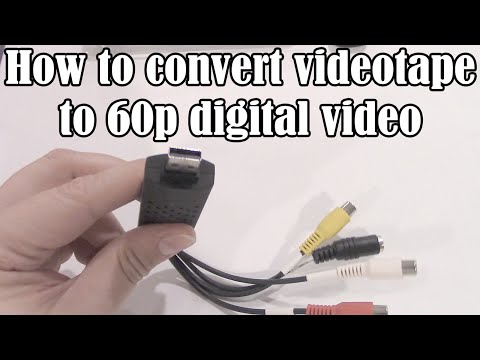
How to convert VHS videotape to 60p digital video (NTSC)
This tutorial will teach you how avoid the most common mistake people make when trying to convert VHS/videotape to digital video — and all it takes is a $20 piece of hardware and free software. Intended for pure beginners, this tutorial walks you through every step to produce perfect conversions every time. (And there aren't really all that many steps.)
Software links:
Virtualdub: http://www.virtualdub.org/
Handbrake: http://handbrake.fr
Common lossless codecs (install these before running virtualdub):
Lagarith: https://lags.leetcode.net/codec.html
UT Video: http://www.videohelp.com/software/Ut-Video-Codec-Suite
NOTE: UT requires more modern processors. If VirtualDub crashes when you use UT Video, use Lagarith.
Tutorial sections:
01:22 — Understanding the problem: Interlaced Video
03:12 — Cheap USB capture devices
04:46 — Free software we'll need
05:31 — Capturing VHS properly
14:38 — Processing VHS captures properly
21:50 — Compress processed files with Handbrake
24:16 — Processing for YouTube upload
FREQUENTLY-ASKED QUESTIONS:
Q: I don't run Windows, I'm on OSX/Linux. How can I post-process an interlaced video correctly?
A: FFMPEG has a good deinterlacer built-in. Download a recent build (2015 or later) of FFMPEG and run it with the following command-line:
ffmpeg -i (sourcefile) -c:v libx264 -preset medium -crf 18 -vf "idet, w3fdif" (outputfile.mp4)
For 1280x720 60p output suitable for blu-ray or uploading to YouTube:
ffmpeg -i (sourcefile) -c:v libx264 -preset medium -crf 18 -vf "idet, w3fdif, scale=960:720:flags=spline, pad=1280:720:160" (outputfile.mp4)
If the output suffers from field order judder, try removing the "idet, " portion.
Q: 720x480 doesn't always look right in players. Shouldn't I capture in 640x480?
A: No, you should capture at 720x480 and then resize to 640x480 after deinterlacing. This is because some drivers actually only support 720x480 and resize themselves, usually with a lower-quality algorithm. If you do it yourself, you get better results. Also, ALWAYS RESIZE *AFTER* DEINTERLACING.
Q: What is the specific model of EZCAP device used in the video?
A: The Syntek STK1160 or STK1150 (both operate the same, mine was an STK1150).
One user reported success with the Dazzle v1.0, SKU code is: 3217C0006944 ordered off of amazon, with drivers mentioned here: https://www.reddit.com/r/speedrun/comments/2je8hf/dvc_100_not_installing/
Q: Everything captures correctly but the audio is out of sync. Any tips?
A: If your audio starts out OK at the beginning of the captured video, but by the end of the video is out of sync, you have a sync drift problem. Instead of using "Sync audio to video by resampling", you can try "sync video to audio by adjusting video timing". This might retain sync at the expensive of a few dropped or duplicated frames.
If your audio is out of sync at the beginning of the captured video and also out of sync by the same amount at the end of the video, that is an audio skew (offset) problem. Try going to Video—Timing and trying different Audio Latency Determination settings: Try automatic with a large number of blocks, like 50. Also, try Fixed with an audio start time of 0ms. If you can't seem to find something that works, then you can try to fix it in Virtualdub after capturing: Load the captured file, then go to Audio—Interleaving and changing the Audio Skew correction values. It starts at 0 (no sync problems), but you can try altering the values and playing the file until it looks like it lines up. Try negative values like -100, -50, and also positive values like 50, 100 until you find something that works.
Q: What about PAL? I have a PAL VCR and PAL tapes to capture.
A: You can still follow this tutorial, but change any framerate reference from 29.97 (NTSC) to 25 (PAL), and change any number of lines reference from 480 lines (NTSC) to 576 lines (PAL). Also, instead top-field-first, you may find that bottom-field-first works for the majority of PAL capture devices (this is in the yadif deinterlacing filter section). Finally, in the Handbrake section, change 59.94 fps to 50 fps. I have converted PAL sources this way and it works, but of course you need PAL equipment (you can't play a PAL tape on an NTSC VCR).
Q: I am ready for the next step in making my videos look great! Is there anything additional I can do?
A: If you want to research how some people make their videos better, try looking into avisynth or VapourSynth (VapourSynth also works on Mac). These let you run better deinterlacing scripts like QTGMC, which is a huge improvement over yadif. As for me, I usually bring the interlaced captured video into Premiere Pro and perform additional steps like noise reduction using the NeatVideo plugin, correcting bad hue and levels, and cleaning up the audio. Then I export to a new intermediate file using a lossless codec for the QTGMC portion and final encode to.MP4.
3647 72

EASYCAP USB Audio Video Capture Adapter TV VHS DVD
EASYCAP USB Audio Video Capture Adapter TV VHS DVD Video DVR USB Capture
buy link amazon
http://stratoplot.com/vfy
buy link Banggood.com
http://stratoplot.com/vc7
Daraz.pk buy link
http://stratoplot.com/veC
Flipkart Buy Link
http://stratoplot.com/vZk
Gearbest Buy Link
http://stratoplot.com/vYF
#EasyCap #Tv #HappyLifeParts
Send Video to your PC through USB port
Record Video in DVD VCD MP3 4 format and save in hard drive
Watch Video on Mobile phone smartphone smart phone Desktop Laptop Monitor Screen Also you can use for setup box or set top box dish recever or us as a tv your phone or mobile connect with otg cable connector and use easy cap on your phone
With Professional and easy to use video editor software Ulead Video Studio 10.0 SE DVD
Super easy setup in minutes
Includes Professional Video Capture Software Honestech TVR 2.5
If the disc you receive happened to be cracked please dont hesitate to contact us for the copy of the disc content
Specification
Chip Model UTV007
Support NTSC PAL video format
Support high quality video resolution NTSC 720x480@30fps PAL 720x576@25fps
Support input Formats record in DVD — R RW DVD — VR, and DVD Video
Video input One RCA composite One S video
Audio input Stereo audio RCA
Support output Formats DV AVI MPEG WMV VCD DVD
Dimension L 90mm x W 26mm x H 15mm portable and easy to store plug & play
Package Including
USB 2.0 Video Grabber
USB Cable
Software on CD ROM Driver Professional Video Capture Software Honestech TVR 2.5 User Manual included
Warm Prompt
The product key is printed on the mini CD itself
The User Manual is all about the Hardware Installation and Software Installation
Get the manual by right clicking to open the CD Drive Disk instead of double left
clicking which directly begins the software installation
As to the specific operation please follow up the instruction of the software player
or refer to the Honestech TVR Help file
Social Media Business Links
Gmail
[email protected]
FaceBook
https://www.facebook.com/HappyLifePartsOfficial
Twitter
https://www.twitter.com/Asim5306
Instagram
https://www.instagram.com/happy_life_parts/
Whatsapp (Just Click on Link)
https://goo.gl/TgSEHG
2508 343

AWESOME IDEA! HOW TO TWIST ELECTRIC WIRE TOGETHER!
AWESOME IDEA! HOW TO TWIST ELECTRIC WIRE TOGETHER!
Thanks — Please Like!
Bright Idea https://www.youtube.com/watch?v=Da2u_tYrJrk
https://www.youtube.com/watch?v=xkTbZENjEbU
https://www.youtube.com/watch?v=j_eGL77OAH8
Drill ideas https://www.youtube.com/watch?v=yyp19c-j-G8&t
https://www.youtube.com/watch?v=Ljk80mF0j0Y
https://www.youtube.com/watch?v=d3310ZSv8bM
https://www.youtube.com/watch?v=6pwd5cdEk04
https://www.youtube.com/watch?v=e6ZGD9_V7CI
Brilliant Idea https://www.youtube.com/watch?v=cWFhpwL6jWg
How to make https://www.youtube.com/watch?v=vgdsrzvwIVE
—————————-
This way you need to twist the wires, the most reliable way that should be used by electricians. LIFE HACKS with electric wire. Every master should know this! On my channel you will find LIFE HACKS AND CREATIVE IDEAS......
music: Markelody — Euphoria https://www.youtube.com/watch?v=7Pyt_xftxM8
1 1

How NASA Reinvented The Wheel - Shape Memory Alloys
Learn more about the design competition here: https://Youtu.be/-jo84Ul8fEo
This video was a paid collaboration with Royal Air Force Engineering
New vlog channel: https://www.youtube.com/channel/UCMet4qY3027v8KjpaDtDx-g
Credits:
Narrator/Director: Brian McManus
Co-Director: Stephanie Sammann (https://www.stephanie-sammann.com/
Sound: Graham Haerther (https://haerther.net/)
Thumbnail: https://twitter.com/forgottentowel
Get your Real Engineering shirts at: https://standard.tv/collections/real-engineering
References:
[1] https://www.nasa.gov/specials/wheels/
[2] https://www.pirelli.com/global/en-ww/life/why-rubber-tyres-don-t-work-on-mars
[3] https://digitalcommons.calpoly.edu/cgi/viewcontent.cgi?referer=https://www.google.com/&httpsredir=1&article=1015&context=mate_fac
[4] http://research.vuse.vanderbilt.edu/srdesign/2009/group8/Papers/2002_Fuentes_Phase change behavior of nitinol.pdf
[5] Metallurgy Mechanism for superelasticity page 590 http://citeseerx.ist.psu.edu/viewdoc/download?doi=10.1.1.455.1300&rep=rep1&type=pdf
[6] https://www.ideals.illinois.edu/bitstream/handle/2142/46673/Jifeng_Wang.pdf?sequence=1
[7] https://youtu.be/sC6_ijmKyd8
Editing Laptop: http://amzn.to/2GKXqb7
Camera: http://amzn.to/2oyVNp9
Microphone: http://amzn.to/2HOxVXu
Patreon:
https://www.patreon.com/user?u=2825050&ty=h
Facebook:
http://facebook.com/realengineering1
Instagram:
https://www.instagram.com/brianjamesmcmanus
Twitter:
https://twitter.com/thebrianmcmanus
Discord:
https://discord.gg/s8BhkmN
My Patreon Expense Report:
https://goo.gl/ZB7kvK
Thank you to my patreon supporters: Adam Flohr, darth patron, Henning Basma, Karl Andersson, Mark Govea, Hank Green, Tony Kuchta, Jason A. Diegmueller, Chris Plays Games, William Leu, Frejden Jarrett, Vincent Mooney, Ian Dundore, John & Becki Johnston. Nevin Spoljaric, Kedar Deshpande
71310 1690
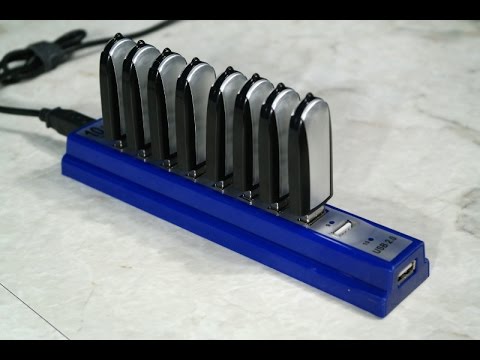
Use a bunch of USB Flash drives in a RAID array.
I experimented with creating a striped RAID array using 8 USB flash drives.
Visit me on Facebook
https://www.facebook.com/the8bitguy
42256 4319

EASYCAP 2.0 DC60 FULL SETUP TUTORIAL
NEW AND IMPROVED TUTORIAL ON MY NEW CHANNEL. PLEASE REMEMBER TO LIKE AND SUBSCRIBE!
LINKS:
QUALITY TEST: http://www.youtube.com/watch?v=3wivRosFmEM
EASYCAP: http://www.amazon.com/EasyCAP-DC60-Creator-Capture-High-quality/dp/B002H3BSCM/ref=sr_1_3?ie=UTF8&qid=1321759340&sr=8-3
EASYCAP DC60 http://www.amazon.com/Easycap-Version-Capturer-Camcorder-Compatible/dp/B0044XIQIW/ref=pd_cp_e_3
RCA CABLE: http://www.amazon.com/RiteAV-6ft-Audio-Video-Cable/dp/B000V0DY7U/ref=sr_1_1?ie=UTF8&qid=1321759489&sr=1-1
SPLITTERS1: http://www.amazon.com/General-Electric-22601-Audio-Cable/dp/B000621WHM/ref=sr_1_12?ie=UTF8&qid=1321759526&sr=8-12
SPLITTERS2: http://www.amazon.com/BestDealUSA-Audio-Splitter-Female-Adapter/dp/B005NY1WK0/ref=sr_1_8?ie=UTF8&qid=1321759586&sr=1-8
WIN7TUT: http://www.youtube.com/watch?v=IwI6uuQqLok
1124 137

How to Fix USB Device Not Recognized - USB Not Working?
How To Fix USB Not Rrecognized. USB Flash Memory Drive Not Opening? USB Device Not Recognized? USB Not Working? Easily Fix a USB drive. When the USB memory wont open, there are 2 usual easy ways to repair USB to get it working again.
Sometimes one of my usb is not working, and this is how I fix it.
I am assuming you've already tried turning the computer off and on again...
▲ Option 1: Reformat usb
▲ Option 2: Reinstall usb
Please be careful with reinstalling usb in the device manager (option 2).
I hope this helps you fix your broken usb drive and get it working again.
►ADDITIONAL FIXES FOR USB NOT RECOGNIZED◄
1) You can use Device Manager to check the status of a plugged in but not recognised USB drive by checking if the "Universal Serial Bus Controller" shows up as working correctly or has a yellow exclamation mark on it when the device is connected.
2) In device manager down the bottom you will see "Universal Serial Bus Controllers" click on the plus sign beside it which will expand that tree. You will see "USB ROOT HUB", right-click on those 1 by 1 (keep all your usb devices plugged in) and click on "uninstall". When you have uninstalled them all shut down your computer completely (DO NOT UNPLUG ANY USB DEVICE) then reboot your computer..........windows should do the rest and reinstall them for you properly.
3) If your computer is using Windows, you can try and use Microsoft's fix it. They offer 2, one for usb specific issues and one for general hardware.
The usb one is here: http://windows.microsoft.com/en-US/windows-vista/Tips-for-solving-problems-with-USB-devices
and the general hardware one is here:
http://support.microsoft.com/mats/hardware_device_problems
▲ A Note On Device Manager
Be careful with device manager. If you're unsure about something, ask for help first.
▲ Video Credits
All content within is owned by their respected companies, developers and publishers.
I, Shockpuppetz, am the creator of the original commentary.
Full captions / subtitles added to the video by request.
.
Tags: (ignore)
USB Flash Drive, how to fix usb device not recognized, usb drive, Fix, usb, drive, flash, how to, fix my usb drive, how to fix a usb, how to fix usb, usb wont open, usb fix, wont open, fix usb, flash memory, usb flash drive, broken, help, easy, computer, working, format, reinstall, corrupt, read, Laptop, Work, Tips, stick, device, usb device not recognized, recognised, hp usb, tool, usb not showing up, how to fix my usb drive, laptop usb not working, formatted, cant find it, how to fix, 2013, repair usb
3928 1515

Laptop me TV kaise Chalaye || Easier Cap ki unboxing or use karne ka traika
Doston is video mai aapko bataunga Easier Cap ki unboxing or use karne ka tarika. Uske liye aapko ye video dekhna hoga. Isse aap kisi bhi set top box ko apne laptop or PC se connect kar sakte hain.
VLC MEDIA PLAYER me TV — https://youtu.be/yOWzryH832M
USB 2.0 Video TV DVD VHS Audio Capture Adapter Video Capture Card Cable
[Coupon Code]: appstore1
[Link]: https://m.banggood.com/custlink/mm3KV3fwPZ
Note :- This video is only made for Education perpose. We do not support any kind of hacking or illegale things or activity.
———————————————————————————————————————
Facebook Page= https://www.facebook.com/dthtricksworld/
Blogger = http://dthtricksworld.blogspot.in
——————————————————————————————————————
SOLID DIGITAL IT BOX HDS2-6141 = http://amzn.to/2gAVVAT
Solid DiSEqC switch 4 in 1 — SD-417= http://amzn.to/2gBb9FM
Sanyo 80 cm (32 inches) XT-32S7000H HD Ready LED TV (Black) = http://amzn.to/2eGm8B4
Micromax 81 cm (32 inches) I-Tech 32T8260HD/32T8280HD HD Ready LED TV (Black) = http://amzn.to/2wBztAM
V Guard TV Stabilizer- Crystal Plus smart for LCD, LED, 3D, Smart TVs upto 47" = http://amzn.to/2eZkI1n
Quantum Satellite Finder For All Dth = http://amzn.to/2gBfVD5
Connector Compression Tool Crimper for RG6 RG59 F BNC RCA Coax Cable = http://amzn.to/2wDGNdt
Generic Coaxial Cable Stripper Coax Stripping Tool for RG59/6/7/11= http://amzn.to/2eFPWO4
OAYKAY WIRE STRIPPER CUTTER 6 INCH 150 MM = http://amzn.to/2iYoyw0
——————————————————————————————————————-
Please is video ko like kare and share kare or mere channel ko subscribe jaroor kare.
——————————————————————————————————————-
easier cap, easier cap hindi, easier cap price, easier cap tv tuner, easier cap software, easier cap laptop, easier cap software windows 10, easier cap driver, easier cap review, easier cap android, easier cap app, easier cap capture, easier cap capture software, easier cap capture driver, easier cap cd, easier cap driver windows 7, easier cap driver windows 10, easier cap driver windows 8.1, easier cap download, easycap vs easier cap, easier cap for android, easier cap how to use, easier cap mobile, easier cap product key, easier cap setup, easier cap setup hindi, easier cap software windows 8, easier cap software windows 7, easier cap software download, easier cap usb 2.0 driver, easier cap usb, easier cap user manual, easier cap usb driver, easier cap viewer, easier cap video capture, easier cap windows 10, easier cap windows 7, driver easier cap windows 7, easier cap 2.0
310 52

Easycap setup (how to use on current and next gen)
Hey guys in this video I show you how and what I use to record my gameplay. If this video help you in anyway remember to leave a like and sub :) things you will need :
hdmi converter : get this one: http://www.amazon.com/Etekcity®-Composite-Video-Audio-Converter/dp/B008FO7PQA/ref=sr_1_1?ie=UTF8&qid=1407718861&sr=8-1&keywords=hdmi converter cvbs
easycap: http://www.amazon.com/EASYCAP-Audio-Video-Capture-Adapter/dp/B0019SSSMY/ref=sr_1_2?ie=UTF8&qid=1407719148&sr=8-2&keywords=easycap
rca/av you can usually find these in random places in your house like behind your cabe box or a dvd player: http://www.amazon.com/RiteAV-Audio-Video-Cable-feet/dp/B000V0DY7U/ref=sr_1_4?ie=UTF8&qid=1407719243&sr=8-4&keywords=rca to rca
550 62
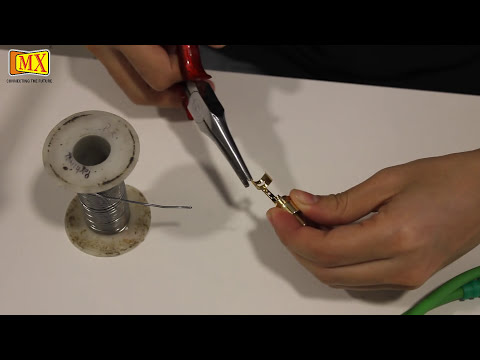
How to make your own RCA Cable
This Video demonstrates how to make MX RCA Cable using solder.
Step 1: Strip off the outer covering using stripper
Step 2: Separate the shield and organize it into single shield
Remove the aluminum foil
Step 3: Remove the outer covering of the core using stripper
Step 4: Solder the sheild and the core
Step 5: Solder the tip and the ring of the connector
Use the stripped off outer cover on the core
Step 7: Soldering the core and the shield on the connector
Step 8: Crimp the connector
Step 9: Test the cable
MX RCA or Composite cables are for serious home theater enthusiasts. MX Precision audio cables offer accurate audiophile sound reproduction. MX Premier video digital cables deliver superior resolution, clarity and color balance.
MX signal path utilizes pure silver plating on all conductor and shielding to allow the highest quality signal transfer and to provide maximum protection against EMI and RFI. MX filter technology provides advanced protection against noise and interference in a unique adjustable design.24k gold plated MX connector resist corrosion and ensure a perfect connection with a simple twist of the connector. MX RCA cable can be used to connect a variety of audio and video devices such as televisions, satellite or cable receivers, VCRs, game console and Home Theater systems.
What is a RCA connector and what is it used for?
The RCA is the professional solution for common Phono or RCA connectors. RCAs are used for HiFi-applications like stereos, TV-sets, video recorders, beamers etc. The spring loaded ground contact of the RCA prevents pop noises when connecting under load. RCA is sold in pairs which are marked red / black.
Please subscribe to our YOUTUBE Channel: MX Electronics (MDRElex)
You can also Like our Facebook Page: http://www.facebook.com/mxelectronics
This video is a complete guide, however if you have any questions feel free to comment or send us an email on [email protected] or visit our website www.mdrelectronics.com
If You Have Any Complaints, Queries Or Suggestions, Call Us On
(022) 4253 6666 Or You Can Mail Us At [email protected]
666 123
