Android Pocket HAM Transceiver
Февраль 3, 2013
This is a short presentation video for the old version (0.3).
Some features: — Connect to a Ham Radio Deluxe console over the network; — Directly connect to a FT8x7 transceiver through Bluetooth; — Connect to my 80/40/30/20 SDR receivers located in KN34bk.
The app is available in Play Store for free download:
https://play.google.com/store/apps/details?id=ro.yo3ggx.rxtx
To discuss about this app (features, bugs, etc) please join the forum at:
http://www.yo3ggx.ro/forum/viewforum.php?f=15
Bluetooth CAT interface is described here:
http://www.yo3ggx.ro/FT8x7_DIY_Bluetootth_CAT_interface_v1.pdf
More details on my web page:
http://www.yo3ggx.ro
The app is still in alpha phase so please be patient and send me your feedback if you play with it.
More details about HRD (Ham Radio Deluxe) here:
http://www.hrdsoftwarellc.com/
73 Dan YO3GGX
598 84
277,570 просмотров

Ham radio with your smartphone! RCForb Android App Explained
Use your Android tablet or smartphone to remotely operate an Amateur radio station via the internet. The RCForb app is available in the Play Store for under $10. More information about the app and the free Windows application is available at Remotehams.com.
10 1


Software-Defined Radio (SDR) on an Android Phone
A software-defined radio system, or SDR, is a radio communication system where components that have been typically implemented in hardware (e.g. mixers, filters, amplifiers, modulators/demodulators, detectors, etc.) are instead implemented by means of software on a personal computer or embedded computing devices.[1] While the concept of SDR is not new, the rapidly evolving capabilities of digital electronics render practical many processes which used to be only theoretically possible. (see more http://goo.gl/FvmZg)
I used a Samsung Galaxy 2 with gISDR Android app by Alex Lee Shing Cheung for a test, and found very good result. Actually, the app require SDR service from a server which selectable from the app. There are features that can be found on the high-end HF receivers such DSP, Filters, Modes, Band, Scope etc which work well on my phone. You can try this free app from Google play, amateur radio catagory. Have fun!
111 25

Get Started with APRS for only $30!
UPDATE: Please click on the annotation to visit SurvivalTech's video response on improving this design. I have received some criticism here in the comments on my design as it is a bit too simplistic to be used on the APRS network.
I explain my basic setup for APRS which uses a Baofeng UV-5R HT and Android phone running APRSdroid and test it by shipping it to Indiana!
For more information:
Baofeng UV-5R at Amazon: http://www.amazon.com/gp/product/B007H4VT7A/ref=as_li_tl?ie=UTF8&camp=1789&creative=390957&creativeASIN=B007H4VT7A&linkCode=as2&tag=tonymill-20&linkId=I5OZ6IF524DAAWDJ
3.5mm Cable: http://www.amazon.com/gp/product/B004LTEUDO/ref=as_li_tl?ie=UTF8&camp=1789&creative=390957&creativeASIN=B004LTEUDO&linkCode=as2&tag=tonymill-20&linkId=DS52FI3E43HTZKSF
APRSdroid: http://aprsdroid.org/
APRS Tracking: http://aprs.fi
Check out my blog at www.tonymilluzzi.com for my other projects with Amateur Radio!
Use this link if you plan to do ANY shopping on Amazon.com; it helps me fund my content and doesn't cost you anything! http://www.amazon.com/?_encoding=UTF8&camp=1789&creative=390957&linkCode=ur2&tag=tonymill-20&linkId=YM5WTCMCX2EDKXGZ
1452 100

Pocket RXTX 0.3 on Sony Xperia Mini
You can run Pocket Transceiver even on a device with a small screen (3").
12 1

Bluetooth CAT 8x7 for Android
Bluetooth CAT application for Yaesu FT8x7
Details about the interface here:
https://www.yo3ggx.ro/btcat/FT8x7_DIY_Bluetootth_CAT_interface_v1.pdf
38 2
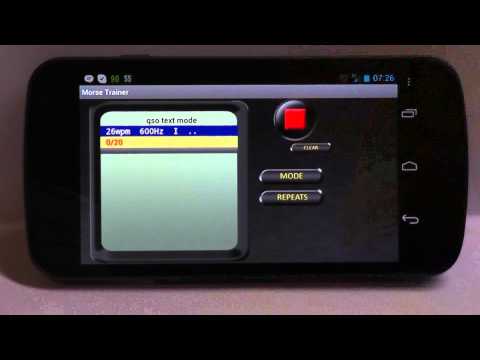
Morse Trainer for Android
Learn or improve Morse code with Morse Trainer.
If you are a ham radio (amateur radio) operator or just want to learn morse code.
With a lot of settings it is very comfortable to adjust Morse Trainer to your current level.
The following settings are available: — Frequency (200 — 2200Hz — Waveform (sine / triangle) — Fading (to reduce click at the end of a dot or dash) — Speed (2Wpm — 52Wpm) — Spacing (spacing between dots or dashes) — Dot-Dash Ratio (length ratio of dashes compared to dots) — Letter Spacing (Space between letters) — Word Spacing (Space between words)
Five different learning modes are available in Morse Trainer — Random groups of five mode: Morse Trainer will play groups of five randomly selected letter, numbers or special characters. Those characters can be individually selected. If you want to learn just "s", "i" and "e" just select the 3 letters and Morse Trainer will create groups of 5 with those 3 letters. — Real ham radio callsign mode: Morse Trainer will randomly play real amateur radio callsign from a database of 5000 callsigns which appeared in Contests over the last couple of years.
— QSO text mode: Morse Trainer will play randomly play QSO text. The database consists of 300 different qso texts. — Most common English words mode: Morse Trainer will play randomly the 500 most used English words. — Own text mode: Enter your own text and Morse Trainer will play it over and over again. — Ebook mode: Text files can be loaded from SD card
Morse Trainer is priced less than the cost of a fancy coffee and it is a great app to learn and improve you CW speed away from your amateur radio station or your PC.
74 1

Using Pocket RxTx v0.7.1-7 on a car multimedia device
Short demo about running Pocket RxTx (version 0.7.1-7) on an Android based car multimedia device (Erisin ES-9401). Only the WebSDR client feature is presented.
The device is connected to the Internet through a 3G USB dongle.
The application is vailable for free in Play Store:
https://play.google.com/store/apps/details?id=ro.yo3ggx.rxtx
Application online help (latest experimental version):
https://www.yo3ggx.ro/pocketrxtx/doc09016/i.html
Application online forum:
https://www.yo3ggx.ro/forum/viewforum.php?f=15
Erisin Car multimedia device:
http://www.erisin.com/erisin-es9401a-8-android-422-car-dvd-vw-passat-golf-touran-caddy-jetta-seat_p497.html
I'm available by e-mail for any other questions you may have.
Thank you.
Dan
53 1

What's new in Pocket RXTX v 0.4
This is a short video showing the new main features in Pocket RXTX version 0.4: — Waterfall — Spectrum — Zoom — Muting
The app is available for download/upgrade in Google Play Store.
The SDR receivers are located in KN34bk and can be accessed from the PC at the following address:
https://websdr.yo3ggx.ro
More details on my web site:
https://www.yo3ggx.ro
Please rate the app and/or send me your feedback if you try it.
73 Dan YO3GGX
69 7

Getting Started with SDR Touch on Android
This is a pretty simple projection to get working. The app and driver can be found on the Google Play Store. Look here for more info: http://sdr.martinmarinov.info/
428 26
