How to format / hard reset your Pipo Smart S1 tablet
Ноябрь 7, 2013
How to format / hard reset your Pipo Smart S1 tablet without PC.
TOOLS NEEDED
Pipo Charger Paper Clip
1. Plug in charger & hold vol down button.
2. Press reset with paper clip, press on vol up vol down to enter android system recovery menu.
3. Use volume buttons to navigate & go to, wipe data / factory reset
4. Select, Yes Wipe all data
5. Wait around 5 — 10 minutes for Pipo S1 tablet to boot.
Thank you for watching.
467 118
342,310 просмотров

How To Do a Hard Reset (Factory Default) on Android Tablets
How To Do a Hard Reset (Factory Default) on Android Tablets.
Works for most Android Tablets.
===========================
1)Power off Tablet
2)Press and hold Volume Up Button
3)While pressing Volume Up Button, press and hold Power Button for 5 to 7 seconds.
4)Let go of Power Button, but continue to hold Volume Up button until Android Logo and Debug Menu comes up.
5)Select Hard Reset/Factory Default with volume buttons.
6)Press Power Button to make selection.
7)Then select 'Yes' to start reset.
*** ALL USER DAT WILL BE LOST ***
5913 914

How to reset Chinese Android tablet
What's inside a modern Android tablet?
https://youtu.be/l3z2XQIzZwo
Click here to see how to reset your smartphone: https://youtu.be/4hku5KhkNmM
In this video i will show you how to hard reset a Chinese Android tablet, step-by-step.
You might want to do a factory reset for your tablet if you cannot unlock it, or the operating system has gone bad.
WARNING: Hard resetting your tablet will delete all data and settings!!!
This procedure works for most Chinese tablets that have a power and a volume button only.
Just follow the 6 easy steps described in the video.
STEPS:
1. Shut down your tablet
2. Press and hold power button and volume up for 5 seconds and then release them. In some tablets you might have to press power button and volume down instead of volume up. Just try it.
3. Wait until the android service menu logo is displayed and then press the power button and the volume button once. Then you will get into the service menu.
4. Navigate using the volume up and down buttons and choose the option "factory reset". Then press the power button to select it.
5. Using the volume buttons select the "yes" option and press the power button.
6. Now wait until the factory reset is done and select "reboot" option from the new menu that appears on the screen.
Wait until tablet is rebooted (it takes a while) and...
Congratulations!!
Now you have to reinstall your apps and settings, as if it was brand new.
3182 775

23 BEST SPY HACKS THAT YOU'VE EVER SEEN
ULTIMATE SPY HACKS
This video is full of spy lifehacks that are super-useful in everyday life! We'll teach you how to take prints from glass, open doors using a plastic card, make a hiding spot and a lot more!
There are a lot of ways to replicate fingerprints! To do this, cover the fingerprint with graphite powder, then apply sticky tape. Another way to copy fingerprints is to use lipstick. Cover the finger with lipstick and use scotch tape.
Check out how to create hidden storage place using faux book spines! This storage idea is inexpensive and easy to make and you can reuse your old books! Moreover, you can make secret stash with old binders that you don’t use anymore, cut them up and staple or tape them together. Ready! Use secret stash ideas for your feelings, money, phone and sometimes even alcohol! :)
Another super handy hack is about hiding money. Don’t know where to hide your saved money while traveling? Whatever your travel destination may be, you should know where to hide your money to avoid risks. And again, we prepared money safety tips for travelers that you can share with your friends! The main rule is to split up your money in different places.
Your hairbrush, lipstick or even sanitary napkin could be used as a safe place when you travel and enjoy new countries. A lot of travelers save their money by sewing their own protective pocket inside of shorts or pants.
Transform an empty lipstick container to stylish USB flash driver!
You're gonna love this message hack! If you accidentally hit send button and want to erase the message, just switch on the airplane mode, your message will immediately be marked as 'not delivered', and you can easily delete it!
TIMESTAMPS:
00:10 Unexpected use of lipstick
00:36 How to fake fingerprints
01:41 Real agents hacks
05:16 Secret stash idea
08:17 Better hide your money
————————————————————————————————————————————
Our Social Media:
Facebook: https://www.facebook.com/5min.crafts/
Instagram: https://www.instagram.com/5.min.crafts/
Twitter: https://twitter.com/5m_crafts
Subscribe to 5-Minute MAGIC: http://bit.ly/2ldditZ
Subscribe to 5-Minute Crafts GIRLY: https://goo.gl/fWbJqz
Subscribe 5-Minute Crafts KIDS: https://goo.gl/PEuLVt
The Bright Side of Youtube: https://goo.gl/rQTJZz
————————————————————————————————————————————
For more videos and articles visit:
http://www.brightside.me
Music by Epidemic Sound: https://www.epidemicsound.com/
276776 26303

فورمات تابلت صيني
طريقة فورمات التابلت الصيني او فرمتة التابلت الصيني او فرمتة ايباد صيني و برنامج فرمتة التابلت الصيني
adb shell download
http://developer.android.com/sdk/index.html
تعريفات التابلت
http://forum.gsmhosting.com/vbb/f723/all-android-phone-tablet-adb-fastboot-windows-driver-volcano-android-tools-1737037/
برنامج الفورمات
http://forum.gsmhosting.com/vbb/f723/all-android-phone-tablet-adb-fastboot-windows-driver-volcano-android-tools-1737037/
1308 101

Free Electricity Generator for Home 220V NEW Electricity Technology Science Experiment For Kids
Free Electricity Generator for Home 220V NEW Electricity Technology Science Experiment For Kids
Today’s Deals, amazon=https://amzn.to/2WA0Chr
Amazon.com=https://amzn.to/2Y9zAys
Fire TV Stick 4K:https://amzn.to/2EeJEOV
Apple AirPods(Latest Model):https://amzn.to/2HmJpmN
Kindle Paperwhite Special Offers:https://amzn.to/2Ho6Z2D
Light Bulb=https://amzn.to/2WIg3EB
Video Games=https://amzn.to/2FKhnQ6
Audio and Accessories=https://amzn.to/2HSrd60
6997 1530
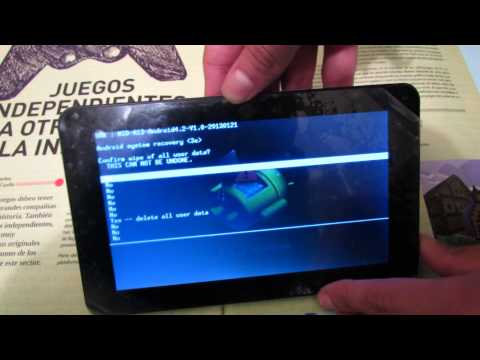
Tutorial Hard- Reset Tablet Android. Resetear/Formatear tablet
En este video se explica como Resetear/Formatear cualquier tablet con sistema operativo Android.
Si su tablet ha estado algo lenta, se bloquean las aplicaciones, no responde adecudamente; la solución es un Hard — Reset.
Hard- Reset: Se trata de devolver muestro equipo hasta el estado de fábrica, quitando toda aquella información y aplicaciones que hemos añadido.
3328 729
New Free internet 100% - Ideas Free internet at home 2019
Hello Everyone!
Welcome to my channel. My channel talking about New Free internet 100% — Ideas Free internet at home 2019
Don't forget to subscribe, like, and comment my video.
I will upload a creative video every day.
Thanks for watching.
This video talks about Free Energy
-free energy
-how to make
-free energy generator
-light bulb
-dc moto
-new technology
-how to
-ideas info
-science projects
-magnet
-motor
-electricity
-diy
-generator
-energy
-experiment
-project
-electric
-magnet with fan 100%
-experiment project 2018
-do it by yourself
-How to get free internet
-free internet
-free internet phone 100% work
Music :
Tobu — Hope [NCS Release]
https://www.youtube.com/watch?v=EP625xQIGzs
167187 37820
![[TUTORIAL] Cambiar ROM PIPO M9](https://i.ytimg.com/vi/EdPzaRcJMi8/hqdefault.jpg)
[TUTORIAL] Cambiar ROM PIPO M9
Buenos días/tardes/noches a todos, en este tutorial os mostraré como cambiar el firmware a la PIPO M9
Si os gusta suscribiros ; )
Root: http://forotek.net/index.php?topic=3379.0
ROM:http://www.flashmyandroid.com/forum/showthread.php?4720-UPDATE-IMG-Sumvision-Cyclone-Voyager-2-4-2-v1-(GB-Incl-Root)
88 1
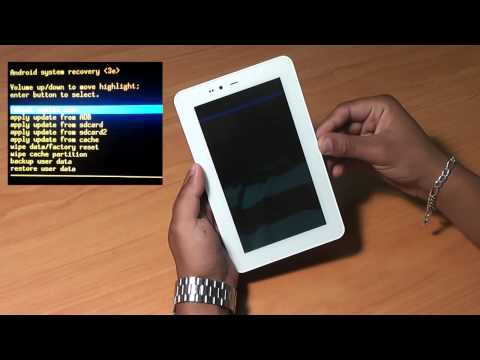
FORMATAGE / REINSTALLATION Android pour Tablette ACCENT EAGLE
je vous présente dans cette vidéo le mode de formatage et la réinstallation de la tablette ACCENT EAGLE.
578 115

Como arreglar Tablet que se queda en ANDROID. UNICA solución 100% real y FACIL Y RAPIDO 2019
En este tutorial se enseña a como arreglar una tablet que se queda en el logo de ANDROID. Este problema es comun en tablets chinas y en el resto. Aqui esta la solución de forma facil y rapida y sobre todo funcional. No busques mas aqui esta la SOLUCION.
********SOLUCION PROBLEMAS CON LINK**************
Muchos no sabemos como saltar las PUBLICIDADES, si no sabes, entra en el siguiente Video(direccion abajo) de un minuto
https://www.youtube.com/watch?v=S1C6sdZ29UM
*************
Primero debes de intentar entrar en modo recovery para eso te recomiendo que entres a a la siguiente página donde se explica detalladamente
COMO ENTRAR A MODO RECOVERY CON BOTONES
Recuerden DAR MUCHOS CLICKS en SKIP AD si se les traba el anuncio
http://tmearn.com/bNm8tw0
Bien, si no te funciono tienes que ver el video.
AQUI ESTA EL LINK PARA DESCARGAR EL PROGRAMA:
http://tmearn.com/ZBa35L [SUBIDO A MEGA] Avisar si se rompe el LINK
Eso es todo, si tienes alguna duda, dificultad, critica, consejo o cualquier problema favor de comentarlo, todos los comentarios son vistos y respondidos.
Si te gusto el video regalame un ME GUSTA y si quieres apoyar al canal SUBSCRIBETÉ.
=========================Habla con max=========================
CONTACTO(Dudas, problemas, consejos, promociones, etc):
Formulario de contacto: http://tmearn.com/OXNbg1 (me llega directo a mi correo)
Mi facebook: http://tmearn.com/Xf3Z2
Página web de juegos: http://tmearn.com/OtiHdscz
Saludos y comenten el tutorial que les gustaría que les suba.
▀▄▀▄▀▄▀▄▀▄▀▄▀▄▀▄▀▄▀▄▀▄▀▄
╔═╦╗╔╦═╦═╦╦╦╦╗╔═╦══╦═╗
║╚╣║║║╚╣╔╣╔╣║╚╣═╬╗╔╣═╣
╠╗║╚╝╠╗║╚╣║║║║║═╣║║║═╣
╚═╩══╩═╩═╩╝╚╩═╩═╝╚╝╚═╝
░░░░░░░░░░░░▄▄
░░░░░░░░░░░█░░█
░░░░░░░░░░░█░░█
░░░░░░░░░░█░░░█
░░░░░░░░░█░░░░█
███████▄▄█░░░░░██████▄
▓▓▓▓▓▓█░░░░░░░░░░░░░░█
▓▓▓▓▓▓█░░░░░░░░░░░░░░█
▓▓▓▓▓▓█░░░░░░░░░░░░░░█
▓▓▓▓▓▓█░░░░░░░░░░░░░░█
▓▓▓▓▓▓█░░░░░░░░░░░░░░█
▓▓▓▓▓▓█████░░░░░░░░░█
██████▀░░░░▀▀██████
12544 1301
